
Fastvue Reporter for Fortinet FortiGate
Monitor AI prompts, internet activity, and risky user behavior with clearer firewall reporting for FortiGate.
The Fortinet FortiGate reporting solution you've been looking for
Fastvue Reporter for FortiGate turns raw firewall logs into practical reporting your team can actually use. From AI prompt activity and internet usage to user investigations, security alerts, and timeline reporting, Fastvue helps you get more value from the FortiGate data you already have, without the headaches.
Built for Fortinet FortiGate
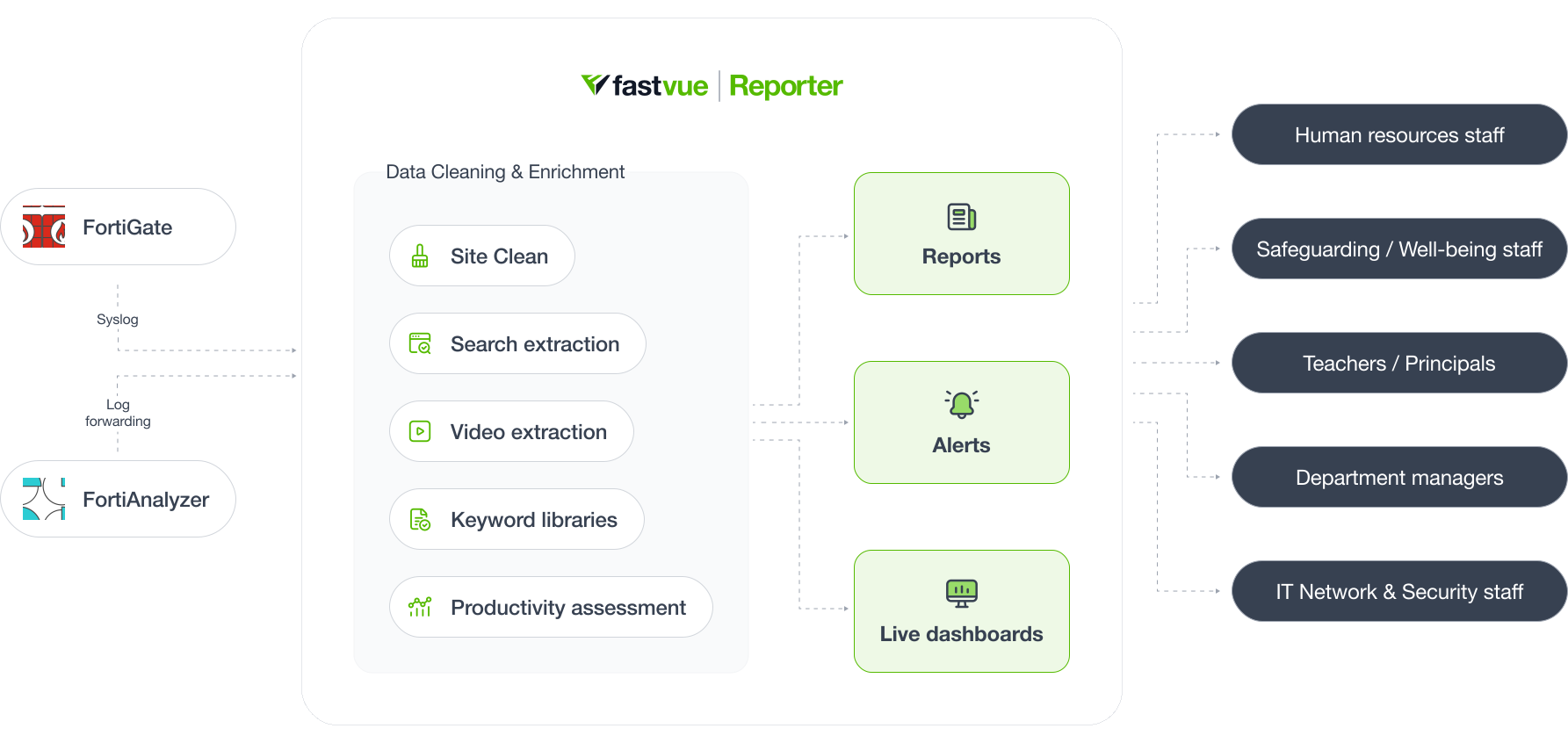
Fastvue Reporter is purpose-built for FortiGate, transforming raw logs into clearer firewall reporting, real-time alerts, and investigation-ready visibility your team can actually use.
FortiGate Reporting Without the Noise
Go beyond top domains and bandwidth charts with clearer visibility into internet activity, AI prompts, searches, videos, and user behavior, with less noise and fewer false positives.
Ditch the IT bottleneck
Give managers, HR, or wellbeing teams clear reports and alerts they can actually use, without IT wasting time interpreting raw logs.
Compare Fortinet FortiGate reporting options
FortiAnalyzer and FortiGate on-box reports
- Designed for network and security administrators.
- Only focuses on security, bandwidth and performance metrics.
- Very basic information on internet usage (top domains, users, and categories).
Fastvue Reporter for FortiGate
- Provides meaningful insights into internet activity with Fastvue Site Clean, search term extraction, video enrichment, keyword detection, and productivity assessments.
- Easy for both non-technical staff as well as network and security administrators to understand.
- Detailed activity timeline reports with full forensic details.
- Get real-time alerts for any type of traffic or network issue.
- Integrates with Entra ID & Active Directory for Department/Group reporting.
- Simple to set up and use.
Fastvue is proud to be a Fortinet Technology Partner. Read the joint solution brief.

AI monitoring that shows what's actually happening on your network
AI Usage Monitoring
Nearly two-thirds of secondary schools use generative AI tools to produce schoolwork. Most of that happens through personal accounts on public platforms, outside the immediate visibility of teaching and wellbeing staff. The same is true across the business sector, where shadow AI usage leaves security and compliance teams flying blind. Fastvue Reporter turns logged AI prompt activity from your FortiGate into clear reporting and real-time alerts. See exactly which AI tools are being used across your organization, including unsanctioned ones, then go deeper with prompt-level visibility. Get instant alerts on matched activity across categories, including self-harm, extremism, drugs, and adult content, or review all AI prompts across your network.

Fastvue Reporter is perfect for

Education
Surface student online safety concerns faster with clearer reporting on searches, browsing, AI prompts, and user activity. Support CIPA and KCSIE-related filtering, monitoring, and safeguarding requirements without piling more manual work onto IT.

Business
Monitor employee internet usage, detect insider risk, and get a grip on shadow AI with clearer reporting that managers and HR can act on.

Public Sector
Local government, libraries, and councils gain clearer visibility into user activity, VPN usage, and bandwidth hogs, with faster, more defensible answers for user investigations, security reviews, and compliance obligations under CJIS and HIPAA.

IT
Reduce network troubleshooting time with clearer reporting on internet activity, security events, bandwidth, and policy-related issues, without digging through raw logs.

Reports
Choose from simple internet usage reports, IT network and security reports, user overview reports, or activity timeline reports. All reports can be filtered, scheduled, shared, and exported.
Trusted by thousands of organizations


What our customers say

We use Fastvue Reporter for reporting company-specific information to our clients (we are an MSP) in a scheduled and controllable manner so that they can better monitor staff usage. The ability to segregate information on a per-company basis is very simple and easy to configure.

Fastvue Reporter is able to intelligently interpret the firewall's log files and extract detailed user activity on the web, during any particular timeframe. This produces clear reports that can be sent to safeguarding officers in real-time or on a schedule.

The best part for me is that once I set up the reports and who they go to, I am out of the loop totally. The department manager can parse through the report, run more detailed reports, and take action without involving me at all as a net admin. Site Clean made it even easier for the managers to understand (How do you explain what a CDN is to the accounting manager?).
Get started in 3 easy steps

Install Fastvue Reporter
Install Fastvue Reporter on a server in your network or private cloud*.

Connect your firewall
Send log data from your firewall to the Fastvue server (usually via syslog) - [see available firewalls](/reporter-overview#firewall-brands "firewall brands").

Enjoy better visibility
Get a better, more comprehensive view of your internet and network usage with easy-to-use reporting and real-time alerts.
* Available as Windows Server software or a Docker image.
Take Fastvue Reporter for a test drive
Download our FREE 14-day trial, or schedule a demo and we'll show you how it works.
All the features for a safer internet and productive network
Reports
- User reports
- Department reports
- Student safeguarding reports
- Allowed/Blocked websites reports
- Activity timeline reports
- Internet searches reports
- YouTube videos reports
- Online productivity reports
- Firewall policy reports
- Security & threat reports
- Network bandwidth reports
- VPN connections reports
- Subnet reports
Dashboards
- Live bandwidth dashboard
- Live productivity dashboard
- Live security dashboard
- Live VPN connections dashboard
Sharing
- Simple report scheduling
- Private report sharing
- Send internet usage reports to managers
- Send safeguarding reports to child welfare staff
- Send security reports to IT teams
Alerts
- Real-time network monitoring
- Fully customizable alerts sent by email
- Safeguarding alerts
- Large download alerts
- Malware and threat alerts
- Unproductive browsing alerts
Other
- Active directory integration
- Simple installation & setup
- Auto-updated keyword lists
- Customizable data retention policy
- Advanced filtering
- Export to CSV & PDF
Technical FAQs
Fastvue Reporter receives syslog data either directly from a Fortinet FortiGate or by forwarding it from FortiAnalyzer. See our Getting Started guide for details on how to configure FortiGate's syslog settings or FortiAnalyzer's log forwarding settings.
Yes! Fastvue Reporter can ingest log data from as many FortiGate sources as you need. Just go to Settings > Sources and click Add Source to simply monitor a port (such as 514) for syslog data from any FortiGate, or add each FortiGate individually.
Once you have a server that meets our recommended requirements, Fastvue Reporter can be installed and begin collecting syslog data in under 10 minutes.
Fastvue Reporter is designed to make reporting on your FortiGate data easier for both technical and non-technical teams, depending on the report type and the access you provide.
Fastvue Reporter is available as Windows Server software or as a Linux-based Docker image. You can self-host the software on-premises, or in your own private cloud or data center.
For Windows, simply run the Windows installer. A Linux setup is a little more 'techie' but still relatively simple if you're familiar with running Docker images.
We recommend deploying the software on a Virtual Machine so that you can scale the CPU and RAM resources as required.
Check out our installation guides for a comprehensive rundown.
As Fastvue Reporter is self-hosted, Fastvue never sees your confidential internet or network traffic log data, and doesn’t impose expensive SaaS data storage costs. It’s a better, more cost-effective way to get safer internet.
How does Fastvue Reporter get data from Fortinet FortiGate?
Can I monitor more than one FortiGate?
How long does it take to get started?
Who can use the reports?
How do I install Fastvue Reporter?
Have another question? Visit our support section for more information.