
SonicOS 6.2.6.0-20n New CFS and New Logging Bugs
The new CFS and ATP Features in SonicOS 6.2.6.0 are amazing, but there is a problem you need to be aware of before upgrading.
 Scott Glew
SonicWALL have released a firmware update (6.2.6.0-20n) that features a complete re-working of their Content Filtering System (CFS), as well as a new sandboxing feature called Capture Advanced Threat Protection (ATP) feature.
These new features are amazing, but there is a problem we'd like all our customers to be aware of before upgrading.
Update #1: We’ve been notified that SonicWALL have fixed this issue described below in a hotfix (6.2.6.0-20n–HF176616-1n). Customers can request this via SonicWALL support now, and it will be included in 6.2.6.1 generally.Update #2: We’ve tested the hotfix and unfortunately there is another logging issue. The size values go from crazy-huge (see below) to crazy-small. SonicWALL are aware of the issue and are working towards a fix.Update #3: SonicWall released another hotfix for the tiny size values (6.2.6.1-25n--HF180023-1n). This only fixes the problem but only for normal HTTP traffic. HTTPS traffic going through DPI-SSL is still logged with tiny size values. This issue is also present in the newer 6.2.7.0 release.Update #4: SonicWall released another hotfix for the small size values in DPI-SSL traffic. The hotfix to request from SonicWall support is SonicOS 6.2.7.1-23n--HF187283. But please be aware of another logging issue in this firmware version that affects reporting on Google searches.
Received Size Logging Bug in SonicOS 6.2.6.0
Unfortunately, there is an issue with the syslog messages sent to Fastvue Reporter for SonicWALL, where most of the 'received size' values are astronomically large.
Here are two log lines sent by SonicWALL running SonicOS 6.2.6.0-20n
id=firewall sn=18B1691F9960 time="2016-08-09 12:50:26 UTC" fw=10.1.1.219 pri=6 c=1024 m=97 app=11 n=304 src=192.168.168.133:53880:X0 dst=104.244.43.199:443:X1 srcMac=28:cf:da:ef:f9:2c dstMac=18:b1:69:1f:99:60 proto=tcp/https sent=517 **rcvd=7562717807960391680** dstname=pbs.twimg.com arg=/ code=58 Category="Social Networking"
id=firewall sn=18B1691F9960 time="2016-08-09 15:34:15 UTC" fw=10.1.1.219 pri=6 c=1024 m=97 app=11 n=4722 src=192.168.168.133:59992:X0 dst=74.125.200.214:443:X1 srcMac=28:cf:da:ef:f9:2c dstMac=18:b1:69:1f:99:60 proto=tcp/https sent=225 rcvd=5367667152344055808 dstname=app.pendo.io arg=/ code=15 Category="Business and Economy"
Note the "rcvd" field. The values here are 7562717807960391680 and 5367667152344055808 respectively.
Affected Reports in Fastvue Reporter for SonicWALL
In Fastvue Reporter for SonicWALL, you will probably first encounter the affects of this problem on the Overview Dashboard:
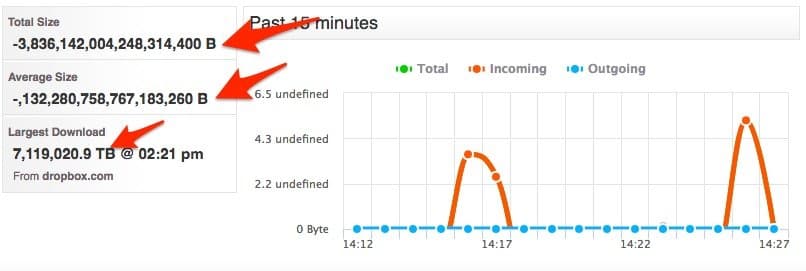
Notice the Total, Average and Largest download sizes. Alternatively, you may see all the values here displayed as zero (0).
Any report, alert or dashboard widget that displays size information will be affected in similar ways.
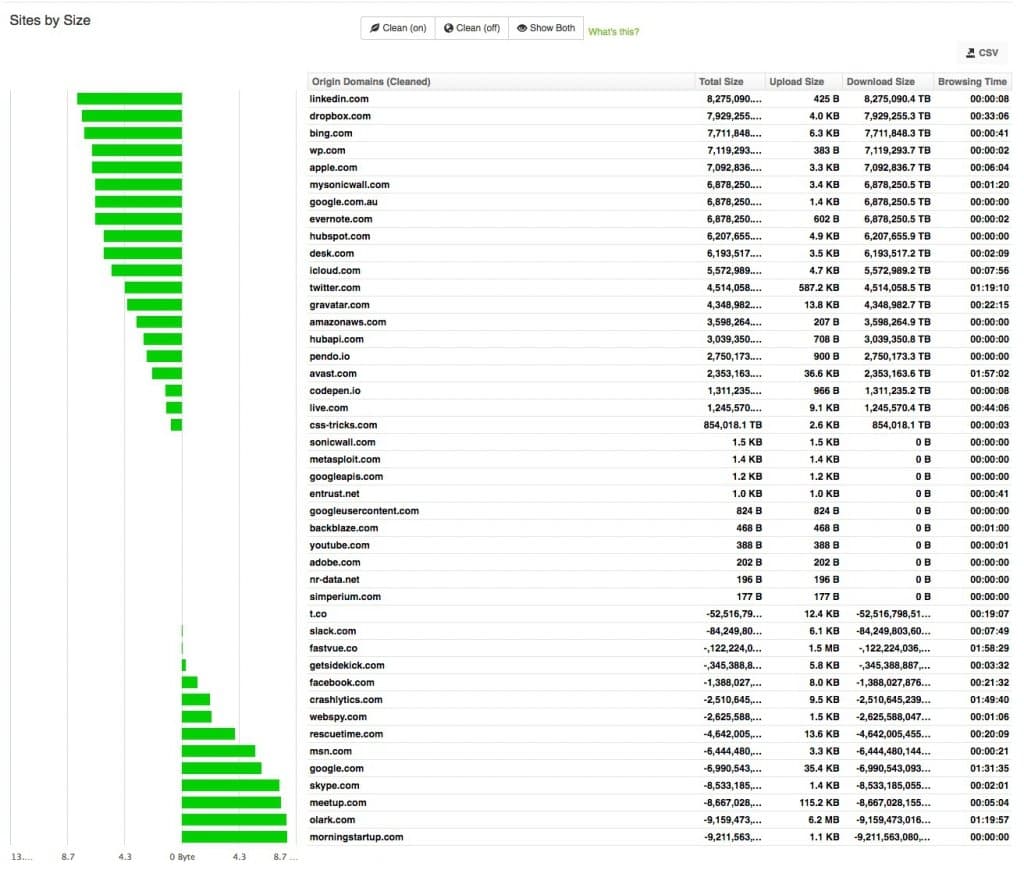
Pretty...
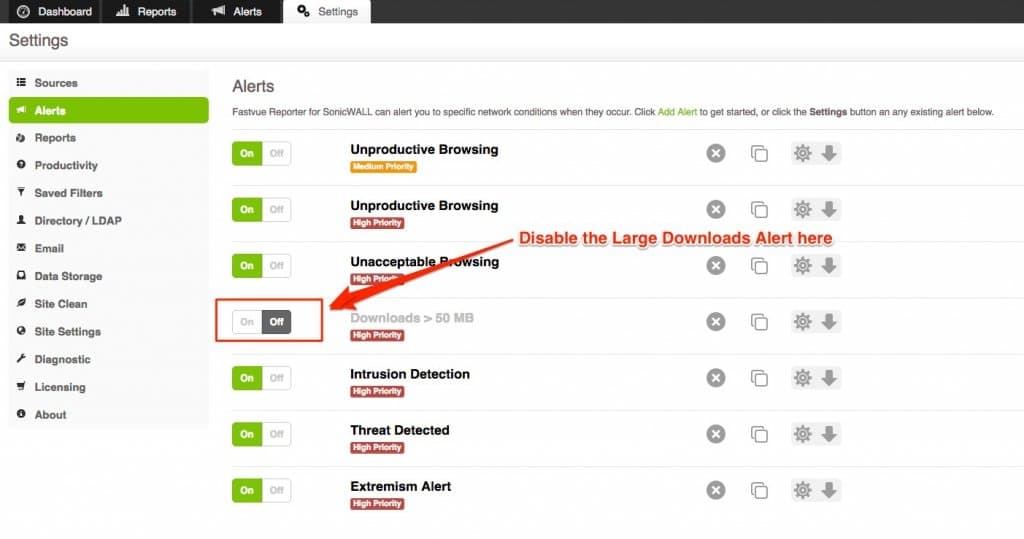
If you have already upgraded, you may like to turn off the 'Large Download' alert as this bug may cause it to be triggered for almost every log record. To do this, go to Settings | Alerts and switch the Large Download alert to Off.
The good news is that the new update fixes the bug we previously reported where categories were not being logged for allowed traffic.
Current Status
It's important to note that SonicWALL Analyzer, GMS and any other syslog collection/reporting tool will also be affected by this issue.
We have informed SonicWALL of the bug and it is currently with engineering. Hopefully, they resolve the issue soon.
Latest Update: SonicWall has fixed these issues in hotfix SonicOS 6.2.7.1-23n--HF187283. The hotfix currently needs to be requested from SonicWall support. But please be aware of another logging issue in this firmware version that affects reporting on Google searches.
We'd love to find a way to work around this, but unfortunately, there's no way we can make sense of the received size value in the data SonicWALL is providing us via Syslog.
In the mean time, hold off on that upgrade if you're enjoying your Fastvue Reports!
12 Comments
Archived from our previous comment system.
- Emre
Hi All,
I also see the " 1585798476548014080 "as rcvd value.- Scott Glew
Hey Emre,
Thank for letting us know. We've just been notified that SonicWALL have fixed this issue in a hotfix (6.2.6.0-20n--HF176616-1n). Customers can request this via SonicWALL support now, and it will be included in 6.2.6.1 generally.
We've tested the hotfix and it does indeed fix the problem!
I've updated the article above with this information.
Cheers!
Scott- Scott Glew
On further testing, the new hotfix has its own bug. The size values have gone from being crazy-huge to being crazy-small (showing only a few KBs after 12 hours of YouTube, Netflix and other video streaming). We've notified SonicWALL, and they'll hopefully have another fix available soon.
- Jamie Hill
Hello,
Have you got any update on this ?
Thanks
Jamie
- admin
Hey Jamie,
We've just received a preview firmware from SonicWALL that hopefully fixes the issue. We've just started testing and so far so good! I don't believe it's public yet, but will hopefully be available to everyone soon!
- Kaden
I am having the same issue with tiny data values, SonicWALL have me on 6.2.6.1-25n--HF180023-1n but that has not fixed it.
Have you guys resolved your SonicWALL syslog issue yet?
I feel like I am getting the run around from them at the moment (they made me apply SP1 of Analyzer - why?)
- Scott Glew
Hey Kaden,
Are you seeing this issue for HTTPS traffic going through DPI-SSL? See my latest comment below.
- Anh
I also notice that the "sent" field started to randomly have "r" after the value as in sent=1234r. This occurred only after the firmware update.
- Scott Glew
Hey Anh,
Thanks for letting us know. We haven't come across that one, but will keep an eye out for it. What tool are you using to view the syslog data?
- Jamie Hill
Is this still an issue in 6.2.7.0? The largest download size is MB's even though I'm downloading GB's
- Scott Glew
Hey Jamie,
Are those GBs downloaded of HTTPS with DPI-SSL enabled? See my latest comment below.
- Scott Glew
Hey Everyone - just an update. We're still seeing issues with the latest SonicOS Enhanced 6.2.7.0-14n release. It looks like the size issues have been fixed for normal HTTP traffic, but for HTTPS traffic going through DPI-SSL, the tiny size value problem still persists.
So even though you may be downloading GBs from youtube.com (for example), only a few KB is logged. Here's some test cases if you want to confirm yourself. Feel free to use our free Fastvue Syslog tool to log the raw syslog messages (http://www.fastvue.co/syslog):
1 MB test:
https://s3.amazonaws.com/cd...id=firewall sn=18B1691F9960 time="2017-02-20 15:05:36 UTC" fw=10.1.1.219 pri=6 c=1024 m=97 app=8460 n=311309 src=192.168.168.133:57417:X0:scotts-mbp.fastvue.local dst=54.231.120.186:443:X1:s3-1.amazonaws.com srcMac=28:cf:da:ef:f9:2c dstMac=c4:ea:1d:50:7e:18 proto=tcp/https op=1 sent=1483 rcvd=269 dstname=s3.amazonaws.com arg=/cdn.fastvue.co/testfiles/1m... appcat="MISC-APPS" appid=1395 code=27 Category="Information Technology/Computers" rule="1 (LAN->WAN)" fw_action="NA"
5 MB test:
https://s3.amazonaws.com/cd...id=firewall sn=18B1691F9960 time="2017-02-20 15:02:30 UTC" fw=10.1.1.219 pri=6 c=1024 m=97 app=8460 n=311269 src=192.168.168.133:57068:X0:scotts-mbp.fastvue.local dst=52.216.81.147:443:X1:s3-1.amazonaws.com srcMac=28:cf:da:ef:f9:2c dstMac=c4:ea:1d:50:7e:18 proto=tcp/https op=1 sent=1483 rcvd=2301 dstname=s3.amazonaws.com arg=/cdn.fastvue.co/testfiles/5m... appcat="MISC-APPS" appid=1395 code=27 Category="Information Technology/Computers" rule="1 (LAN->WAN)" fw_action="NA"
10 MB test:
https://s3.amazonaws.com/cd...id=firewall sn=18B1691F9960 time="2017-02-20 15:03:20 UTC" fw=10.1.1.219 pri=6 c=1024 m=97 app=8460 n=311279 src=192.168.168.133:57101:X0:scotts-mbp.fastvue.local dst=52.216.81.147:443:X1:s3-1.amazonaws.com srcMac=28:cf:da:ef:f9:2c dstMac=c4:ea:1d:50:7e:18 proto=tcp/https op=1 sent=1483 rcvd=269 dstname=s3.amazonaws.com arg=/cdn.fastvue.co/testfiles/10... code=27 Category="Information Technology/Computers" rule="1 (LAN->WAN)" fw_action="NA"
Notice the tiny value in the rcvd field in each log line.
We have reported the issue to SonicWall and they are working on a fix.