
Blocking Sites with Forefront TMG
This article reviews methods of blocking sites with Forefront TMG's URL Filtering to ensure that your rules are as broad or as specific as they need to be.
 Richard Hicks
Fastvue TMG Reporter gives you great insight into what sites are being accessed. Forefront TMG administrators are often surprised to see sites in their reports that they believed were being blocked by their Forefront TMG access rules. By running reports on these sites, they often discover that it is due to an unintended consequence of another access rule that permits traffic for a different situation.
I thought it would be useful to review the various methods of site blocking to ensure that your rules are as broad or as specific as they need to be.
URL Filtering Concepts
Most companies implement URL filtering or site blocking to some extent. This is done for various reason such as keeping users productive or securing them from malicious sites. Forefront TMG access rules contain a source and destination where you can add a Network Entity (also often called Network Objects). These are specified in the From and To tabs when creating your access rule:
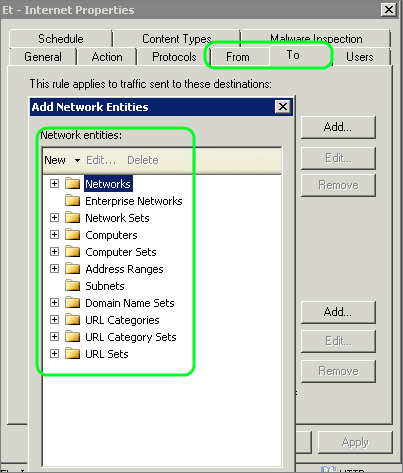
The types of Forefront TMG Network Entities include:
- Networks
- Enterprise Networks
- Network Sets
- Computers
- Computer Sets
- Address Ranges
- Subnets
- URL Sets
- URL Categories
- URL Category Sets
- Domain Name sets
- Web Listeners
- Server Farms
Choosing the right type of Network Entity is critically important when creating Internet access rules that restrict users from specific sites.
Blocking Sites with Forefront TMG
Forefront TMG makes it easy to implement the appropriate level of URL filtering, whether it be high level or very granular. When blocking a site, you are mainly interested in using one of the following four network entities:
- URL Category Sets
- URL Categories
- Domain Name Sets
- URL Sets
Each entity above has a different level of granularity.
To illustrate the various options we will look at blocking the site imo.im. IMO is a cross platform messaging application, enabling chats between different IM networks such as Skype, Gtalk, Yahoo etc.
Forefront TMG URL Category Sets
At the highest level you can utilize Forefront TMG's 11 URL Category Sets such as Communication, Entertainment, and General Productivity. These contain various URL categories such as Chat, Blogs/Wikis etc, which can be edited based on your organization's requirements.
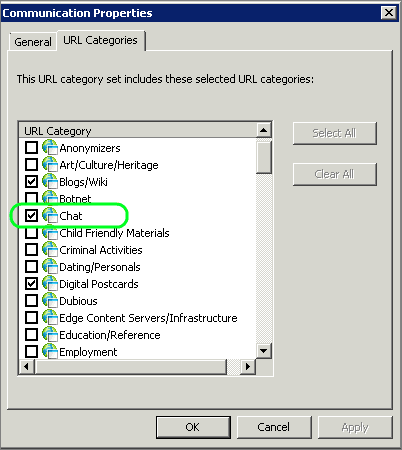
The default Category set that imo.im falls into is Communication that contains the following categories:
- Blogs/Wiki
- Chat
- Digital Postcards
- Forum/Bulletin Boards
- Online Communities
- Sites
- Usenet News
- Web E-mail
- Web Phone
- Web-based Productivity Applications
Using a Category Set would work, but it would also impact a huge amount of other sites.
Forefront TMG URL Categories
The next level involves utilizing Forefront TMG's 80 URL Categories. These categories contain various URL’s that are dynamically sorted into one or more of the categories. Categories can be overridden by specifying the URL pattern and an alternate category.
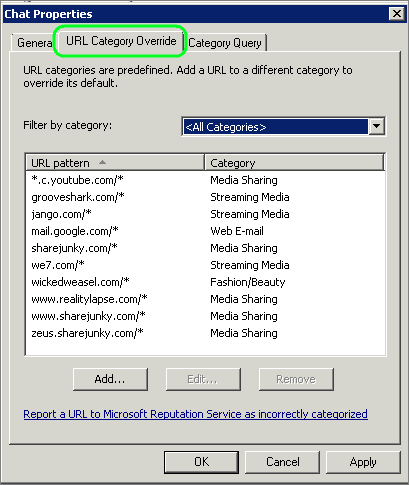
The list of categories is fixed in that you cannot add your own custom URL category.
The URL category that imo.im falls into is Chat. This category also includes a load of other chat sites such as:
- imo.im
- Meebo.com
- Skype.com
- chat.yahoo.com
- chat.zoho.com
- www.ebuddy.com
If blocking all IM traffic is your goal, then blocking at the URL Category level may be an appropriate option. But if you only want to block imo.im, then this method will block a large amount of other sites that you may want to grant access to.
Forefront TMG Domain Name Sets
Forefront TMG's Domain Name Sets are very useful when you need to block or allow a single domain. You can also utilize wildcards such as *.google.com. The restriction is that the wildcard can only be at the beginning or the end of the specified domain.
You could block imo.im using a wildcard such as:
- *.im
This would effectively block the site but would also block
- Chat.im
- Messenger.im
- Gtalk.im
- All site that belong to the Isle of Man National Top Level Domain (.im)
Specifying *imo.im would work, but would also block sites ending in imo.com such as proximo.com and limo.com. *.imo.com would be a better option to block the entire domain and its sub-domains.
But lets say for arguments sake that you only want to block part of the domain. In this case *.imo.im is still too broad.
Forefront TMG URL Sets
Forefront TMG's URL sets have the advantage of being very granular. You can also specify either HTTP or HTTPS. The drawback is that you have to be granular when you configure them.
URL Sets enable you to grant access to a specific part of a site while blocking access to another. This is something we would not be able to do with a domain set.
Back to our example, we could configure a URL Set as follows:
- imo.im/*
This will block all access to https://imo.im, however IMO predominantly communicates over HTTPS, which would still be allowed using the above URL Set. To block HTTPS, we also need to include the port in the URL Set:
- imo.im:443
- imo.im:443/*
Your URL set should now look like this:
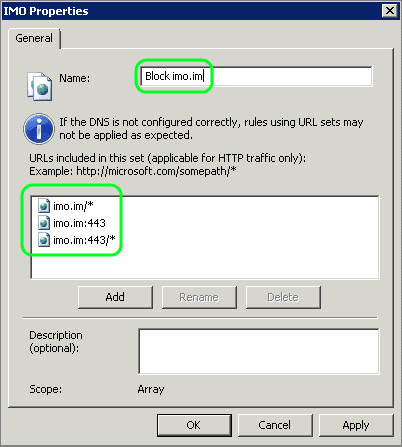
This is a very granular way to block access to IMO.
But lets say that you want to allow access to the sub-directory imo.im/information. To do this, you can add an exception using the following URL Set :
- imo.im/information/*
The TO tab in your Forefront TMG access rule would contain the following network entities:
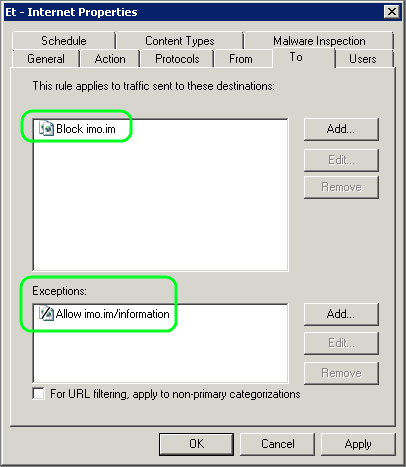
This would allow access to the /information/ subdirectory but block everything else.
One thing to note is that it is not possible to specify subdirectory path information if HTTPS is used. The exception for the sub-directory is therefore only possible for HTTP traffic and not for HTTPS.
Conclusion
The four URL Filtering methods above can be used in various combinations to achieve the desired level of control and access.
However, as more rules are added over time, it can be very easy to configure rules that conflict in some way, such as inadvertently blocking white listed sites or vice versa.
Fortunately TMG Reporter can help you identify sites you thought were blocked, or other sites that should be blocked. By running reports on these sites, you can easily identify the access rules that are allowing or blocking the traffic.
Using TMG Reporter and your knowledge of the different levels of URL Filtering above, you can consolidate your rules making them easier to manage and maintain, and providing more effective protection for your network.
For more information on URL Filtering concepts and how to fine-tune TMG Reporter for your requirements see Customizing Website Categories with Forefront TMG's URL Filtering.
17 Comments
Archived from our previous comment system.
- Richard Hicks
I'd like to also point out that when using wildcards in Domain Name Sets, blocking *.im.com would still all you to access http(s)://im.com. The wild card implies that it must be something.im.com for which im.com is not. As a best practice, when creating Domain Name Sets I will always include both *.im.com and im.com. :)
- anhptnn
Dear Richard Hicks
You are god, thank you so much!
I tried many many ways but always fail
- magui
Hello Etienne,
I have created the website www.tentickleargentina.com and I have received an email from someone in South Africa telling me that when they try to access this website they get a message from Forefront saying "access to the requested file is blocked due to a detected infection: Category Exploit
Infection Name: Exlpoit: HTML/IframeRef.zI can open it fine here in argentina. Can you please help me? Does this mean that this website does have a virus? do I need to install somthing in this website to override this ForeFront blocking?
Please Heeeeeeelllllppppp!!
- Etienne Liebetrau
Hi Magui
I have just run a test connection to your site and I do get the same malware alert. You can check the Microsoft article for more info on the detected malware. This would hopefully give you a good place to start looking.
http://www.microsoft.com/se...
Malware on a page would not necessarily prevent a page form loading. It would just prevent transferring of infected page elements. In your case the actual iframe script seem to be the problem and therefore block anything form loading.
Hope this helps
- Mohi Ismail
Dear Sir,
My name is Mohi Ismail from Egypt, and I need you help with GTM S/W
I'm using GTM with windows XP in my company .. I'm using it to block sites such as face book from employees but in same time I gave permission to manager to open it. But still they cannot access it.
With employees it's successful they cannot open it, but what do you think the reason that managers cannot open although they have permission
Can you help me please
Many thanks in advance
Mohi Ismail
MIS/Egypt- Scott Glew
Hi Mohi,
Thanks for the question. It sounds like the rule to block employees is overriding your rule to allow managers. One way to verify this is by going to logs and reports and running a query for one of your managers (username = domainmanagersname), then get the manager to access one of the sites in question. You should see their attempts in the live log viewer and see what Rule is responsible for blocking access. Make sure your allow rule is above this blocking rule in the list of web access rules in TMG.
I hope this helps!
- rigardt
hi
has something changed in tmg? I have set this rule up exactly as above but I can still access imo.im. can someone help please? I can even organise remote access to my tmg if required.
thanks
rigardt- Scott Glew
Hi Rigardt,
Where does the blocking rule sit in your list of rules? Is there any chance there is another rule allowing the site first?
If you're using TMG Reporter, you can run a report filtered by "Site Domain equal to imo.im" and then go to the Rules section. You'll see all the Rules allowing the site. You can also get this information using a Query in the Logs and Reports section of the TMG Management console.
Hope this helps!
- DOLEEB
please help me i'm trying to block the facebook web site from TMG ,but still working in some users using https protcol
- Scott Glew
Thanks for getting in touch. What is the full URL of the facebook hits being allowed? You can find this either by running an Activity Report in TMG Reporter (Site Domain equal to Facebook.com), or by running a query in TMG's Logs and Reports view (URL contains facebook).
You might find that the URL is:
http://www.facebook.com/plu...This is the URL that a Facebook 'Like' button triggers when you see it on another web page.
How have you blocked the site? Are you using URL Category Sets, URL Categories, Domain Name Sets or URL Sets?
Cheers!
Scott- Marco Lazzarotto
Hi, we too in our company are blocking Facebook domain.
But when and employ tries to navigate to a site with a Facebook plugin(Like and share buttons) embedded in it, eg. http://padcom13.blogspot.it..., it gets a BIG overlay with FF2010 denying the embedded Facebook plugin.
So he is forced every time to inspect that page(Firefox "Inspect element" function" and delete the html code.
So my question is: how can I block Facebook, while allowing Facebook social plugins? Or, even better block Forefront overlay?
Screenshot: https://db.tt/rCC4rci1
- Brad Naumann
We also have the same problem with forefront. Ironically, it happens on this page as well. The buttons are bringing up banners that are quite large and cover up content on the webpages
- kurosaki
How Block All Web , and Opening some selected web
- ramin
hey guys wanna know how to block mobile apps(specially viber ) through TMG 2010
an early reply would be greatly appreciated
- Etienne Liebetrau
Hi there
Have a look at this article, I think it might be exactly what you are looking for.
http://fastvue.co/tmgreport...
If not, just let us know.
- fayza
method to Block All Web , and Opening some selected web (step by step please)
- OMAIR
i have a big problem if anyone solve this i am very thankful to him.... i have blocked proxy sites in tmg also fcebook, torrent sites but when my user's add zenmate extension to browser then it bypass TMG. then i enable https inspection but https inspection blocked all https traffic even google is blocked... so what can i do ?? i need such a solution that google and other https sites are opened that we are need in company but sites like torrent, facebook,youtube etc are blocked when zenmate is enabled...