
Forefront TMG Forms Based Authentication Template for Exchange 2013 OWA
We've created a new mobile friendly Forefront TMG Forms Based Authentication template in the new Exchange 2013 style. Download it here!
 Scott Glew
A little while ago, we posted a Mobile Friendly Forefront TMG Forms Based Authentication template to make logging into internal sites protected by Forefront TMG easier on phones and tablets.
Soon after we added a template specifically for Exchange OWA and thanks to some community contribution (thanks ablanken!), fixed some bugs to do with the public/private network setting.
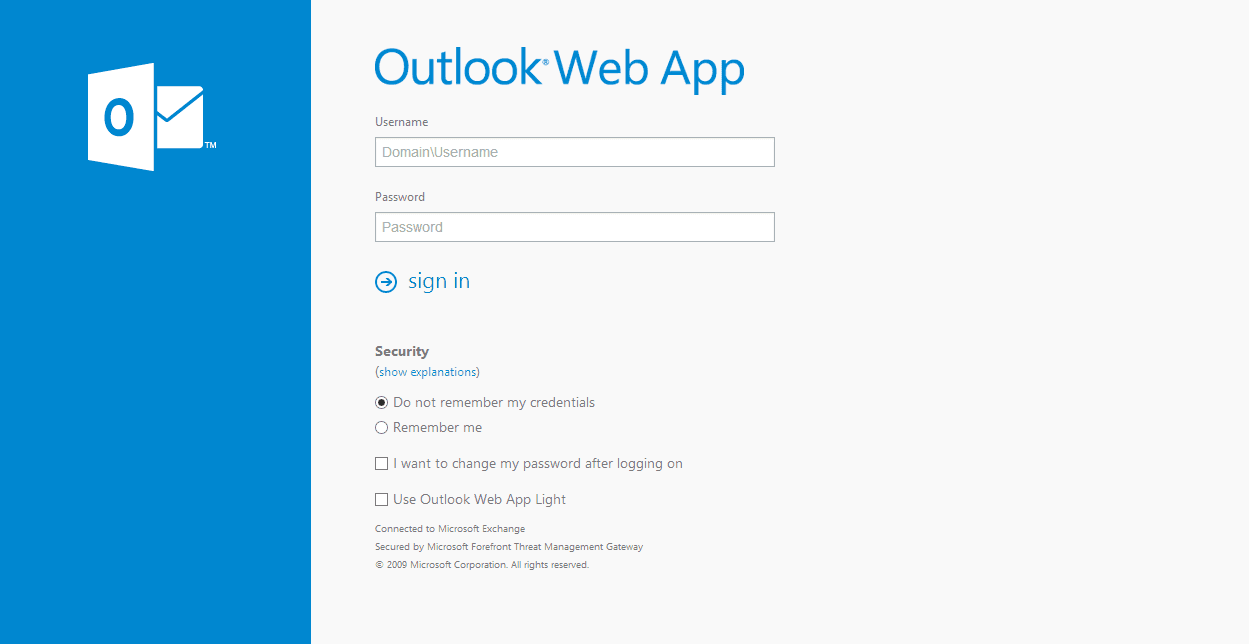
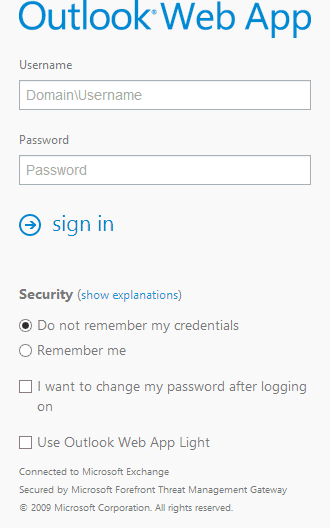
With the release of Exchange 2013, we thought we'd create a new mobile friendly authentication template in the new Exchange 2013 Outlook Web App style.
Here's what it looks like for both Desktops and Mobiles:
To use the new template:
- Download the new template package here, or from the GitHub repo. The package contains three templates; ISA, Exchange and Exchange 2013.
- On your Forefront TMG Server, copy the existing Exchange OWA Template folder at: C:\\Program Files\\Microsoft Forefront Threat Management Gateway\\Templates\\CookieAuthTemplates\\Exchange
- Call the duplicated folder 'Exchange2013' (or whatever takes your fancy). You should now have a folder here: C:\\Program Files\\Microsoft Forefront Threat Management Gateway\\Templates\\CookieAuthTemplates\\Exchange2013
- Copy all files in the Exchange2013\\HTML folder in the above template package zip into the HTML sub-folder of your new 'Exchange2013' folder (replace the existing files). Feel free to replace Logo.png with your own custom logo.
- In your TMG Management console, edit your desired Web Publishing rule and go to the Listener page. Click Properties.
- On the Authentication page, ensure HTML Forms Authentication is selected.
- On the Forms Tab enter Exchange2013 (you don't need to enter the entire path, just the word 'Exchange2013' without the quotes)
- If you used the Exchange Publishing Wizard in Forefront TMG, you also need to go to the Application Settings tab and enter 'Exchange2013' in the 'Type the custom HTML for set directory' edit box.
- Apply the changes.
- Restart the TMG Firewall Service (yeah, I know... Unfortunately TMG Caches these pages and restarting the service is the only way to clear it as far as I know).
Thanks very much to our good friends Richard Hicks and Will Smothers for persevering through countless Firewall Service restarts helping us test the template and bolt it into good working shape!
Enjoy and we look forward to hearing what you think in the comments!
55 Comments
Archived from our previous comment system.
- alex johnson
Can this be ported to UAG?
- Scott Glew
Hey Alex,
It looks like customizing the UAG portal is a bit more involved but certainly achievable if you have some html, css and javascript experience. I don't have the bandwidth to port this to UAG right now, but I would love for someone to contribute this to the project on GitHub. Anyone? :)
- Abdarrhman Obied
i follow above, but for logout page the logo image are very big and cover the text, and for changing password page its not change.
does this can be modified to be same in exchange 2013.
- Scott Glew
Hey Abdarrhman,
Thanks for trying it out. What browser are you using when viewing the logout page? Are you able to send a screenshot to support@fastvue.co?
At the moment, I've only customized the login and logout pages, but I'll look into customizing the 'change password' page too. Stay tuned.
Cheers!
Scott
- Marc Grote
Hi Scott,
great work.
best regards Marc Grote
- Scott Glew
Thanks Marc!
- Cory
I've tested putting this form in place on our TMG server and everything's working except for the message at the bottom of the form says "Secured by Microsoft Forefront Threat Management Gatewayy" with an extra "y" in "Gateway".
Have you ever run into this?
- Scott Glew
Hey Cory,
Thanks for reporting this!
The GitHub repo has been updated with the fix. Either download the latest, or to fix the problem yourself, open the usr_pwd.htm file and search for:
@@L_SecuredByISAyDelete the y at the end to make it
@@L_SecuredByISACheers!
Scott- Cory
Haha. I must have submitted right after you did.
- Scott Glew
Haha. Synchronized bug fixing for the win! Thanks again for reporting it Cory. Much appreciated.
- Cory
I found the issue. The usr_pwd.htm file included in the ZIP contains the string "@@L_SecuredByISAy". I removed the "y" and that fixed the issue. You may want to update the repository. :)
- Luke
Hey Scott,
Love your work on this.
I too am having the issue experienced by Abdarrhman whereby the logoff message is hidden behind the logo.
Currently running in IE9, works fine in Firefox.
Cheers
Luke
- Scott Glew
Hey Luke,
Thanks for letting me know. Is IE running in compatibility mode by any chance? Go to the page and hit F12 to bring up the dev tools. Have a look at the Document Mode Menu. Change it to IE9 if it is set to anything lower.
Let me know if this helps.
Cheers!
Scott- Luke
Thanks Scott, that worked. For some reason IE thinks the default document mode is Quirks Mode.
Not sure if is something in my configuration, but when I hit view source the DOCTYPE is commented out.
Cheers
Luke
- Scott Glew
Hey Luke,
Glad to hear that was the issue. I made a change to the files recently to force IE not to render the pages in compatibility mode. Grab the latest template .htm files from the project and hopefully that fixes the issue.
The HTML5 Doctype declaration is:
<!DOCTYPE html>The exclamation mark is part of the declaration. Is this what you're seeing when you say it's 'commented out'? It could just be a rendering issue with IE's 'View Source' function.
- Craig Osmond
Any chance you are able to include the chpwd files also in the Exchange 2013 format?
- Scott Glew
Hey Craig,
It's on the list of things to do. Sorry I haven't had a chance to get to it yet. If you're good with HTML, it's really just a matter of copying and pasting the @@blah tags from the existing chpwd file into the new template (usr_pwd.htm) making sure all the IDs of any HTML controls are the same. Then testing and cleaning up any rough edges :)
Cheers!
Scott
- Ashish
Using TMG 2010 with the latest updates and cant seem to make it work. After doing the changes listed above, the URL errors out with:
Error Code: 500 Internal Server Error. Element not found. (1168)
- Scott Glew
Hey Ashish,
Thanks for letting us know about this. We haven't heard about this from others using the same template. Make sure ALL of the contents of the zip file are extracted to your template folder (including javascript files, html files and images etc), and then restart the TMG Firewall service to clear the cache. Also clear your browser's cache (Ctrl + F5) and retry.
There is a related article on the error you're seeing here:
http://forums.isaserver.org/500_Internal_Server_Error%25_Element_not_found%25_%2FCookieAuth%25dll%3FGetLogonRedir%3F%3F%3F%3F/m_2002095649/tm.htmI hope this helps! Let me know how you go!
Cheers!
Scott- Ashish
Hi Scott,
Thanks for the quick reply and yes, you are right. I was only copying the HTML folder(from the zip) and not the Test folder. Once I copied everything, it works!
I see that only the logon and logoff pages have the new look, and post logon the UI is Exchange 2010. Is that correct or am I missing something?
Regards,
Ashish- Scott Glew
Hey Ashish,
Glad to hear it's all working now.
That's right. This project only relates to the Authentication Forms you see when Exchange is published through Forefront TMG. Once you're past those forms, you'll be directed to whatever version of Exchange you're using. Only the login and logout pages have been customized. You'll still see the old forms for any other pages such as the 'Change password' page.
I'll hopefully get to those pages soon, unless someone else wants to do them and contribute to the github project?
Cheers!
Scott
- Persée Durán
Hey Scott,
Thank you for this template.
I am using it already and everything seems to work fine except for the "Change Password after loggin on" choice.
If I check that box it does redirect me to the change password webpage, but is not able to do the password change.
Could you help me setting this up?
Regards,
Persée Durán- Scott Glew
Hey Persée,
Thanks for getting in touch. I haven't customized the change password page yet so I don't see why it wouldn't work. Does it work when using the normal/old template?
Cheers!
Scott- Persée Durán
Well, I just did the test with the normal/old template and surprisingly... did not work.
So we have discarded a template issue.
This is the first time I configure the TMG, maybe you have any suggestion?
Thanks in advance.
Persée- Scott Glew
Hey Persée,
Sorry, I don't have much experience with troubleshooting the Change Password feature, but have a read through these two articles:
http://technet.microsoft.co...
http://blogs.technet.com/b/...
Hopefully the answer is in there somewhere!
Cheers!
Scott
- Adam
Im getting Error Code: 500 Internal Server Error. Element not found. when I click logoff. Any idea why ?
- Scott Glew
Not sure Adam. I haven't heard about this before. Does it happen when you don't use the template?
- Adam
When I dont use template it works fine.
- Scott Glew
It sounds like there is a file missing in the Template's folder. Did you copy the everything from the default template folder (C:Program FilesMicrosoft Forefront Threat Management GatewayTemplatesCookieAuthTemplatesExchange) then copy in the few files from my Template?
- Adam
Yes, I did
- Scott Glew
Hey Adam,
Can you verify that the file 'logon_redir.htm' is present in the template folder?
Cheers!
Scott
- Waqas Ahmed
Hi,
We are using Exchange 2013 SP1. We are also facing the same issue, On the OWA page, when I click on Sign out, OWA doesn't sign out.. It gives me "Sign Out" window with statement: "To finish signing out, please close all browser windows".
In TMG OWA rule i have included this to publish server logoff page: /owa/logoff.owa. But still its not working.
Forms authentication is disabled, basic and windows are enabled.
Please guide to solve this issue.
Regards,
- Scott Glew
Hi,
I believe what you're seeing is the default behaviour when using non-forms-based authentication.
http://support.microsoft.co...
- Gunnar Hermansen
Hi Scott,
Just want you to know, that I tested the form with SMS PASSCODE Multi factor authentication, and it worked perfectly. Thanks for a great job :-)
- Chris
Did you have to do anything beyond the steps above? I enabled PassCode auth with RSA tokens and it doesn't render the updated look at all. It seems when you enable PassCode auth, it points the default page to another file that hasn't been update with the new layout.
- Scott Glew
Hey Chris,
Unfortunately I've only reworked the form for Windows Authentication as mentioned in the Issues section on the github repo: https://github.com/scottgle...
I'll hopefully get to the others soon! I've been wanting to spend some time on this project to rework the change password page and a few other items some people have mentioned.
If you want to try it yourself, it should be relatively easy to find the page that TMG is serving for PassCode auth, compare it to the page it usually serves for Windows Auth, and find the differences. Then copy my new template for windows auth and paste in or remove the differences. For example, there may be extra input fields on the PassCode form.
- Dhillan
Hi,
I read through your post and have tried to implement the solution but have had issues. I have copied everything from Exchange/HTML to Exchange2013/HTML and copied your files into this folder. I have noticed that images do not load at all. I can email you a screenshot if necessary.
I would love to get this working correctly. Please advise if i have done something wrong.
- Scott Glew
Hey Dhillan,
Open the developer tools in your browser (F12 in IE) and browse to the form. Are there any errors in the Console section? If so, what are they?
Feel free to email me - scott at fastvue dot co
- Scott Glew
I just discovered another potential issue that could cause some of the problems mentioned here.
Ensure that the files you copy out of my zip file do not have the property "Encrypt contents to secure data".
The files will appear 'green' in Windows explorer if this option is on. If so, right-click the files and go to Properties. On the General tab, click Advanced and uncheck the "Encrypt contents to secure data" option.
- Brandon
Hey Scott,
Do you know if this would work with ISA 2006?Thanks,
Brandon- Scott Glew
Hey Brandon,
Great question! I'm not sure if it would work or not. Do you have an ISA 2006 still up and running to test it with? I'd be interested to hear the result.
Cheers!
Scott- Brandon
Thanks for the quick reply...yes, we still have 2006 and I might give it a try...if I do I will reply back. Just didn't know if you had anyone try it before.
Thanks,
Brandon- Scott Glew
If they have, I haven't heard anything. :) Good luck!
I do also have some pending commits to make. I've been through and modified all the other forms such as the change password form and the forms for the other authentication types.
They're just being tested at the moment.
- Scott Glew
OK - everything has now been committed.
- Philip Nunn
This is great! Thank you to all who worked on putting this together. I did find another typo. "Exchange2013/HTML/logout_smimecap.htm" String "@@L_SecuredByISA" has another extra y at the end.
- Scott Glew
Hey Philip, Thanks for picking up that typo. I've fixed it and updated the file(s) on the GitHub repo.
Cheers!
Scott
- Wolfgang
This is cool, thank you.
The only problem is I did everything in your manual but the old form (the yellow one) is still showing.
The favicon got changed.
Thank you,
Wolfgang - Wolfgang
I found the problem.
As soon as you've RSA SecurID enabled for Authentication in your Web Listener it is showing the old form with the old yellowish pictures.
As soons as you change the authentication validation mehod of the web listerner to Windows or LDAP it works. - Wolfgang
I found the problem.
As soon as you've RSA SecurID enabled for Authentication in your Web Listener it is showing the old form with the old yellowish pictures.
As soon as you change the authentication validation method of the web listener to Windows or LDAP it works. - Wolfgang
Sorry, I was to delighted when reading all and tested immediately but didn't read the github issues ;)
- welsen@it-news.net
Ok, I'm very sorry for spamming but on github it states that I should find a customized form for SecureID in the 2013 HTML folder
But there is none.
Like in all the other folders you can only find the usr_pwd and not the usr_pwd_pcode or usr_pcode.Thank you so much,
Kind regards,
Wolfgang"Due to popular demand, I have now customized all forms in the Exchange2013 folder including the Change Password form, and the forms used for Radius and SecureID. However in the other two folders (Exchange and ISA), only the usr_pwd.htm file has been customized. This file is served only when using Windows (Active Directory) authentication (set on the Authentication page in step 5 above).
If you're using Radius or SecureID and prefer to use the ISA or non-2013 Exchange forms, feel free to contribute to the project! :) Otherwise, I'll get to them when I can. "
- Scott Glew
Hey Wolfgang,
Thanks for your comment and sorry for the delayed response.
If you go into the Exchange 2013 folder in GitHub you can see all the additional files:
https://github.com/scottgle...You can also see them in the Exchange2013/HTML folder in the downloadable zip file:
https://github.com/scottgle...The pcode.htm file is one of these files. I don't believe there is any such thing as usr_pwd_pcode or usr_pcode.
Do you see the files?
- Eugene Koziol
Hi, thank you so much for these. I seem to have an issue with removing the 'DomainUsername', as we would only like to have 'Username'. I have the default domain specified, but the form continues to show 'DomainUsername.' I am able to login with just the domain name. Any ideas?
Thanks,
- Scott Glew
Hey Eugene,
You can change the label text for the username field to display whatever you like. In your template's folder, open the Strings.txt file in notepad and look for
L_UserName_Text="Domainuser name:"Change "Domainuser name" to just "Username" or whatever you'd like to see.
Then save the file and restart your firewall service.
- pamir
Thank you.
It is a Simple tool to edit the Forms Based Authentication page and make it different than what's default.
http://www.platani.nl/Blog/...
To change all the templates.
Tell me where the language of choice? Thank you.
I also changed the shape of "CookieAuthTemplatesISAHTMLusr_pwd_pcode_OTP.htm"
The archive contains the original files - template TMG and fbaeditor
https://cloud.mail.ru/publi...The official guide MIcrosoft; http://technet.microsoft.co...