
Hosting Multiple Web Sites On A Single Host with IIS and Forefront TMG
This article describes the different methods of hosting multiple web sites on a single host using Microsoft IIS, and publishing web sites with Forefront TMG
 Richard Hicks
Hosting and publishing a single website on a web server is pretty straightforward. However when it comes to publishing multiple web sites on a single server, there are a few ways to go about it, each with its own pros and cons.
Understanding these options will allow you not only host standards compliant websites but also publish them successfully through Forefront TMG.
When you install Fastvue TMG Reporter, you are installing a web application running on top of Microsoft IIS. Although you do not need to know how to administer IIS websites to use TMG Reporter, this article may be useful in increasing your understanding of hosting IIS websites, and also publishing them to the public Internet using Forefront TMG.
Background
Every service offered or hosted by a server must be uniquely addressable. This is normally achieved by assigning different port numbers to the various services. TCP/IP packets contain the IP address and the destination port number. This ensures that the request is handled by the correct service. In this way, a single server can host multiple services such as RDP on port 3389, DNS on port 53, Telnet on port 23 and so on.
Hosting multiple web sites on a single server presents a problem as you now have a duplicate service. The way to work around this is to have an alternative binding for each web site. The bindings provide the mechanism for making each site a unique service.
There are three methods for biding a site.
- Port Number
- IP Address
- Hostname
These binding are made at the site level through the Microsoft IIS Management Console.
Microsoft IIS is the web server that comes with Windows. It is installed as part of the Web Server role in Windows Server editions, or can be 'turned on' as a feature in Windows Desktop editions (vista, 7, 8 etc).
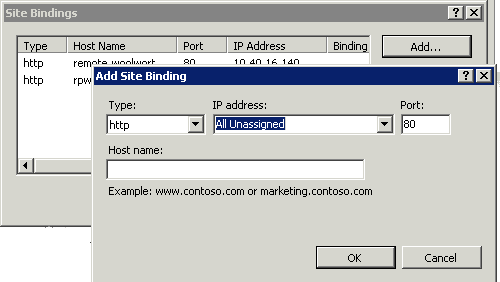
Port number binding
Using non-standard port numbers as a binding method introduces a few issues and is not frequently recommended. Port numbers are regulated and need to be assigned correctly. Contrary to popular belief they cannot just arbitrarily be picked at random to host multiple web sites. Port numbers are assigned based on three ranges:
- System Ports (0-1023)
- User Ports (1024-49151)
- Dynamic and/or Private Ports (49152-65535)
The use of these ranges is described in RFC6335. System Ports are assigned by Internet Engineering Task Force (IETF).
If you are wondering why you do not normally have to specify a port number when accessing a website, the answer is pretty simple. Since the standard for HTTP is port 80 all browsers automatically add the port number in the request. The same is true for HTTPS running on port 443.
Typically when sites are hosted in this manner, the server's DNS name is used. When using unique port binding, the DNS to IP to Site ratio is 1 to 1 to many.
1. DNS = webserver - IP = 10.0.0.9 - URL = http://webserver.mydomain.com:802. DNS = webserver - IP = 10.0.0.9 - URL = http://webserver.mydomain.com:8888
IP Address binding
Adding an additional IP address to the web server allows you to again create a unique service by binding each site to its own IP address. Adding additional IP addresses to the server can lead to duplicate DNS entries and other routing related issues, but these are very well documented and easy to mitigate.
When using IP address bindings, a DNS record needs to be created for each site and refer to the correct binding.
When using IP address binding the DNS to IP to Site Ratio is 1 to 1 to 1
as1. DNS = WebsiteA IP = 10.0.0.10 URL = http://websiteA.mydomain.com2. DNS = WebsiteB IP = 10.0.0.11 URL = http://websiteB.mydomain.com
Hostname binding
One of the most common binding methods is binding by hostname. Using hostname bindings you can serve multiple sites on a single IP on standard ports. IIS interprets the hostname from the HTTP host header and directs the traffic to the correct web site. Unlike binding on port number or IP address that uses Transport layer differentiation, binding by hostname uses the Application layer.
This means that you have multiple DNS entries referring to the same IP address.
The DNS to IP to Site Ratio is typically many to 1 to many
1. DNS = WebsiteA IP = 10.0.0.10 URL = http://websiteA.mydomain.com2. DNS = WebsiteB IP = 10.0.0.10 URL = http://websiteB.mydomain.com
Publishing sites to the Internet with Forefront TMG
The way the bindings are implemented on the server affects the way these sites are published to the Internet through Forefront TMG.
As public IPs are limited you would want to use a single IP for as many sites as possible. And since arbitrary port numbers are typically blocked by corporate firewalls, you would want to use port 80 and 443.
This really only leaves host headers as the viable method to publish multiple sites.
The way this is accommodated in Forefront TMG is by creating a single web listener tied to a single public IP address but with multiple DNS names. This common listener can now be used by multiple web publishing rules to publish the various sites.
The Public Names tab in the web publishing rule allows you to specify which external public domain names correlate to the respective internal site.
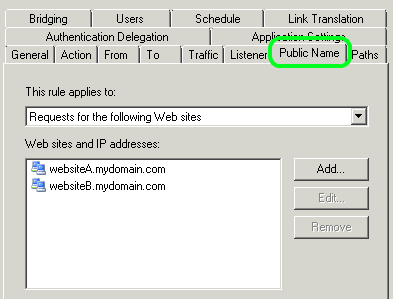
Sites bound with alternate port numbers
Forefront TMG allows you to bridge different port numbers. This effectively converts traffic running on one port to another. This allows you to serve a site to the public Internet on port 80 while it might be running internally on port 8888.
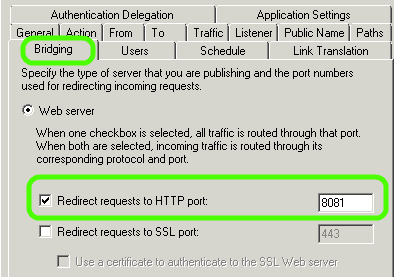
When using port number binding you will also need to have a separate rule per site. This is because even though you can have a common listener the destinations ports have to be explicitly defined.
Sites bound with separate IP addresses
Forefront TMG allows traffic to be forwarded to a name but it also allows you to manually specify an override IP address. In this case, since traffic will always be directed to a unique IP address, you will also need a separate rule per site.
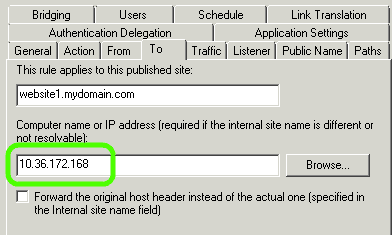
Sites bound with alternate hostname bindings
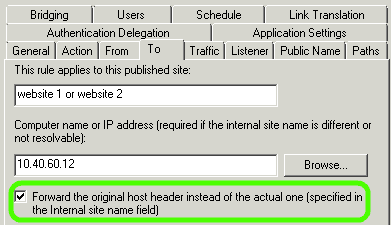
Forefront TMG allows you to forward the original host header information. This allows you to use a single rule to publish multiple sites. By enabling the Forward the original host header... option, Forefront TMG will pass on the host header it received from the client to your internal web server. The Microsoft IIS site will need to have host header binding to match this.
HTTPS, SSL and Certificates
Things gets a bit more involved when it comes to using HTTPS. This is because one of the features of HTTPS is certificate-based host validation. In other words, the host header needs to match the certificate. The main limitation here is that only one certificate can be used per IP address on a Forefront TMG web listener.
To securely publish multiple sites on a single external IP, you need to use a multi-domain or SAN certificate that is valid for all hostnames.
The same complication also exists on the web server side. When using multiple SSL sites, unique bindings can only be made per IP address. It is best to use multiple single domain certificates, one per IP. Since internal IPs are not normally limited, this is not an issue.
Conclusion
Depending on your deployment requirements, there are several ways to publish sites using Microsoft IIS and Forefront TMG. Understanding these options along with their limitations and consequences helps you to choose the best method.
When possible I prefer to host every web site on a unique internal IP. In the bindings, I also bind the hostname to that IP address for HTTP. This makes the HTTPS binding straight forward as well. It also adds to security as it limits the allowed hostnames served by IIS.
When publishing the internal site to the Internet I also prefer to keep a unique internal IP and unique web publishing rule.
So the golden ratio is 1 Public DNS Name to 1 Public IP to 1 Internal DNS name to 1 Internal IP to 1 internal site.
This provides maximum flexibility but also requires the most IPs. If you have IPs to spare then this tends to be the best approach.
5 Comments
Archived from our previous comment system.
- Michael
How can I add more than one https listener with one cert if I have one public IP?
I want to publish Exchange and sharepoint with one public IP, both on different webserver (mail.contoso.com and sp.contoso.com), each with one cert. Both should use https with port 443.
- Rain
Please use wildcard certificate and assign to the web listener
- Pertti
Hello,
I have question about publishing a new website on an existing Exchange 2007 server through Threat Management Gateway(TMG)2010.
Is it possible to do?The Exchange server 2007 now
• "Exserver" (netbios name) is functioning as CAS server meaning that also Exchange webservices like
OWA and Activesync are installed under the "Default Web Site" on IIS7.
• Bindings are to default ports http:80 and https:443 ,
• 1 internal IP address on the serverSSL certificate now
• Third party SSL cert is acquired and installed on "Exserver" and "TMG" .
• SSL cert is a SAN cert containing common name "mail.company.fi", and alternative names, "autodiscover.company.fi" , "Exserver.company.local" and "Exserver"
• 1 listener called "OWAlistener", created with this SAN cert installed to TMG , cert name "mail.company.com"
• OWA and activesync are published on TMG , 1 public IPPlanning another Website on "Exserver" and publishing on TMG:
• Installing another web site "SecondWebSite" can be done on the Exserver..but the binding for http must be a different port (e.g. 8080) than for the "Default Web Site"
So if I understood right... if we want SSL to be used also for the "SecondWebSite"
we have:
• get another cert to the "Exserver" for the new site "SecondWebSite" (imported also to "TMG"
• another public IP on the TMG
• another internal IP for "Exserver" to bind it for SSL 443 for the new site "SecondWebSite"
• create another Web Listener for this "SecondWebSite" with previous informationIs this right?
…or is there still a possibility to use this OWAcert and OWAlistener to get this "SecondWebSite" published trough TMG by using this exisitng SAN cert and 1 public TMG IP?
- Pertti
Hello,
I have question about publishing a new website on an existing Exchange 2007 server through Threat Management Gateway(TMG)2010.
Is it possible to do?The Exchange server 2007 now
• "Exserver" (netbios name) is functioning as CAS server meaning that also Exchange webservices like
OWA and Activesync are installed under the "Default Web Site" on IIS7.
• Bindings are to default ports http:80 and https:443 ,
• 1 internal IP address on the serverSSL certificate now
• Third party SSL cert is acquired and installed on "Exserver" and "TMG" .
• SSL cert is a SAN cert containing common name "mail.company.fi", and alternative names, "autodiscover.company.fi" , "Exserver.company.local" and "Exserver"
• 1 listener called "OWAlistener", created with this SAN cert installed to TMG , cert name "mail.company.com"
• OWA and activesync are published on TMG , 1 public IPPlanning another Website on "Exserver" and publishing on TMG:
• Installing another web site "SecondWebSite" can be done on the Exserver..but the binding for http must be a different port (e.g. 8080) than for the "Default Web Site"
So if I understood right... if we want SSL to be used also for the "SecondWebSite"
we have:
• get another cert to the "Exserver" for the new site "SecondWebSite" (imported also to "TMG"
• another public IP on the TMG
• another internal IP for "Exserver" to bind it for SSL 443 for the new site "SecondWebSite"
• create another Web Listener for this "SecondWebSite" with previous informationIs this right?
…or is there still a possibility to use this OWAcert and OWAlistener to get this "SecondWebSite" published trough TMG by using this exisitng SAN cert and 1 public TMG IP?
- ravinder Pal
Is it possible that we can host 55 web sites on single static ip in TMG ??????