
How to Fix Web Application Proxy and AD FS Certificate Issues (Error Code 0x8007520C)
I received the error "The operation stopped due to an unknown general error. Error code 0x8007520c" on my Web Application Proxy. This is how I solved it:
 Uilson Souza
I recently moved my lab environment from one storage to another, and after moving the files and re-configuring the Hyper-V VMs, I received the following error from my Web Application Proxy (WAP):
The operation stopped due to an unknown general error. Error code 0x8007520c
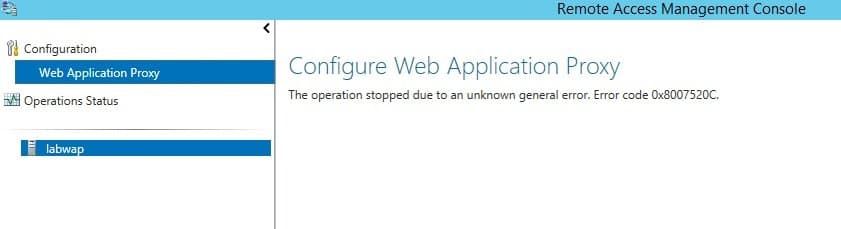
For some reason I was unable to the Fastvue Reporter website that I previously published on this server, and access to the back end IIS server was not working.
Lab Configuration
Let me show you how my lab environment is configured:
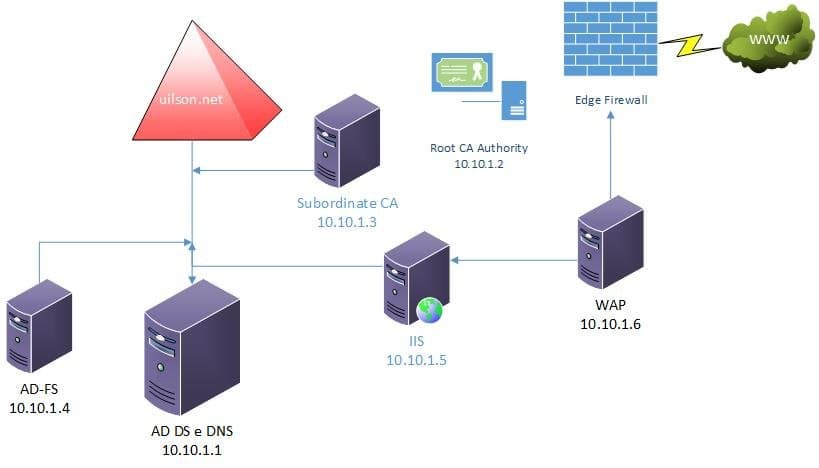
My domain "uilson.net" contains the following servers:
- AD DS and DNS – labdc.uilson.net – 10.10.1.1
- Root CA Authority – labrootca (stand alone server) – 10.10.1.2
- Subordinate CA – labsubca.uilson.net – 10.10.1.3
- AD Federation Services – labadfs.uilson.net – 10.10.1.4
- IIS / CRL-CDP-AIA / Application Server – labiis.uilson.net – 10.10.1.5
- Web Application Proxy (WAP) – labwap.uilson.net – 10.10.1.6
The labiis server hosts a non-claims application which receives pre-authentication from labadfs using my AD DS account to log in. Requests pass through labwap and then to labadfs for authorization. The user receives the AD FS authentication page requesting their AD DS credentials which forwards them to the IIS server (labiis).
Did you know: Fastvue Reporter also runs on IIS and produces clean, simple, web usage reports using data from your firewall that you can confidently send to department managers and HR team.
Event Log Troubleshooting
When trying reach the web application, access was completely down. When looking at the Event Viewer on lapwap I noticed the following event:
Unable to retrieve proxy configuration data from the Federation Service.
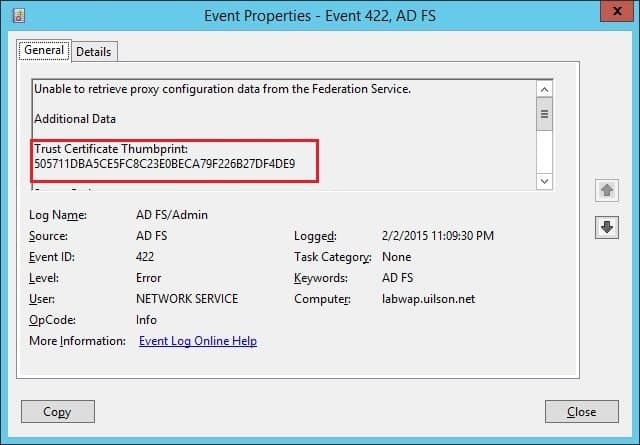
The error says that the WAP was unable to retrieve the configuration from the AD FS Server. I therefore logged onto the AD FS Server and discovered the following event:
The federation server proxy was not able to authenticate to the Federation Service
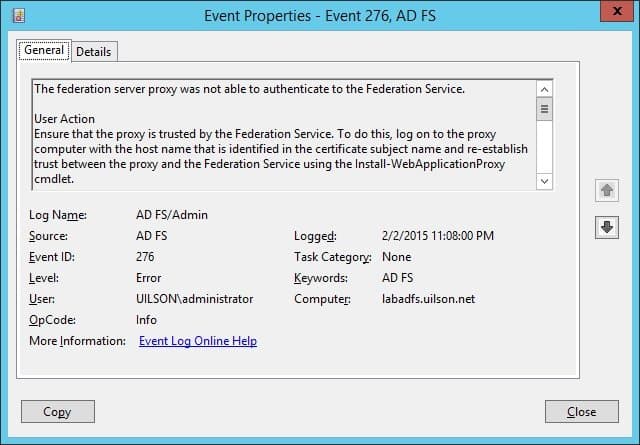
The AD FS Server says it's not possible for WAP to authenticate, and that there is something wrong with the certificate between both servers.
Comparing Certificate Thumbprints
When comparing the certificate thumbprint provided by the WAP Server event with the one used by the AD FS certificate, I noticed they were completely different:
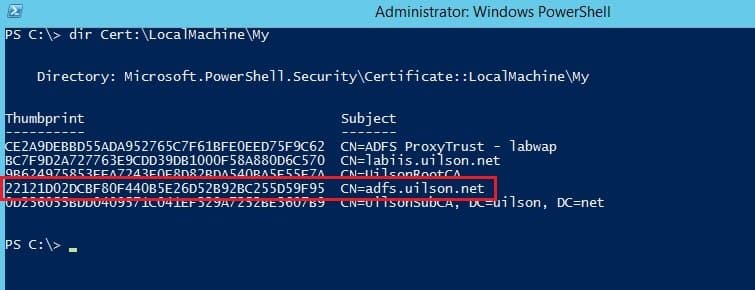

If you look at all certificate thumbprints, you won't find any starting with "50571.." mentioned in the WAP server event.
Re-establishing Trust Between WAP and AD FS
After some research, I decided to do exactly what AD FS Event ID 276 says to do: Run the Install-WebApplication Proxy cmdlet on the WAP server to re-establish trust between AD FS and WAP:
Install-WebApplicationProxy -CertificateThumbprint ’22121D02DCBF80F440B5E26D52B92BC255D59F95' -FederationServiceName ‘adfs.uilson.net’
The command above re-installs the correct certificate on the WAP Server. Note that I'm using the correct certificate thumbprint (starting with 22121…):
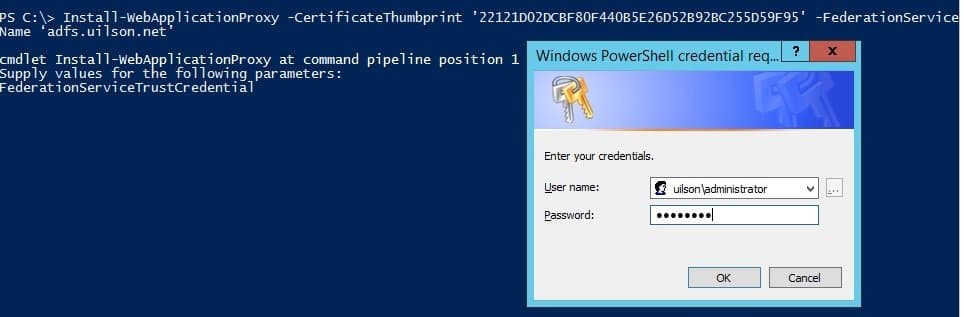
You need to provide your credentials in order to execute the cmdlet.
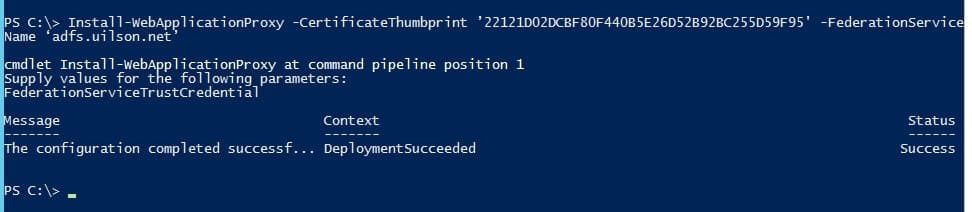
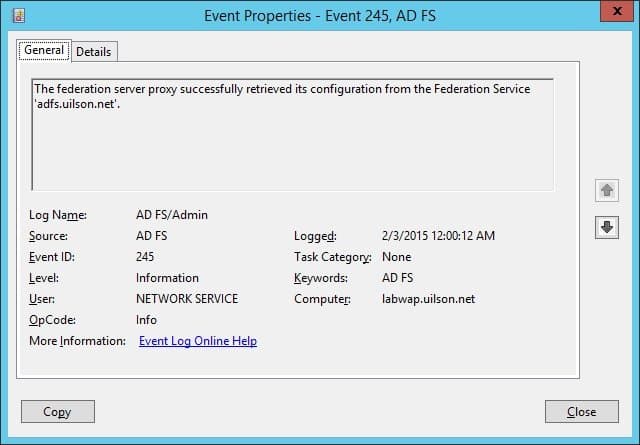
After running this cmdlet, the WAP server came back online and the configuration could be successfully retrieved from AD FS.
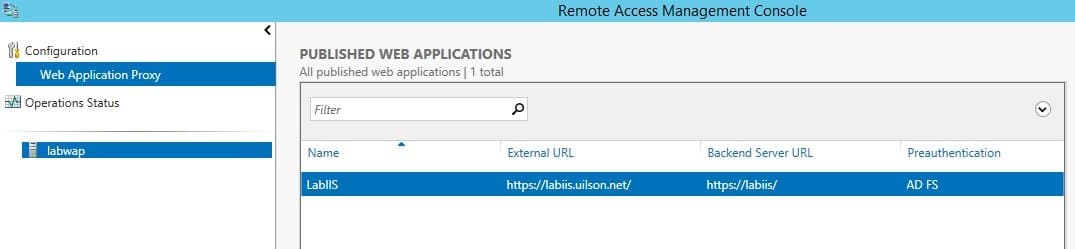
I could successfully view the published web applications and access to the IIS back end server was restored:
Reason For The Trust Issue Between WAP and AD FS
Once everything was working, I was curious to know why the error occurred in the first place. My Microsoft WAP/AD FS Program Managers informed me of the source of this problem:
The proxy trust certificate is a rolling certificate valid for 2 weeks and periodically updated. This is stored in an internal, protected store so you won’t see it in any of the usual certificate stores. What you see in the local machine store is the initial temporary certificate thumbprint used while the proxy trust is first being established. This explains why the WAP event log error included a strange, unknown certificate thumbprint.
If you leave your WAP server offline for more than 2 weeks, the proxy trust certificate will expire and you’ll need to re-initialise the proxy trust (which is what I did with the Install-WebApplicationProxy cmdlet).
This can also happen when you move your VM's configuration to another storage - as was my case!
You can also solve this issue by setting the following registry key to 1 on the WAP server and re-running post-install config from the Remote Management console:
HKLM\\Software\\Microsoft\\ADFS
ProxyConfigurationStatus
- 1 (not configured)
- 2 (Web Application Proxy is configured)
I hope this helps anyone experiencing similar issues. Please leave your comments if you have any further questions!
Take the pain out of reporting on Web Usage and Network Traffic.
Fastvue Reporter produces clean, simple, web usage reports using data from your firewall that you can confidently send to department managers and HR team. In particular it can help support IT and network security teams with managing bandwith, reducing IT workload and troubleshooting with ease thanks to live alerts, dashboards and scheduled alerts. Automate reports and get the job of reporting on web usage off your desk and into the hands of people that need it. Download the 30 day free trial today!
10 Comments
Archived from our previous comment system.
- Zachary Ascherl
You are missing a step, that may or may not effect different users. Run this command on primary ADFS server before Installing the thumbprint on the proxy server: Set-AdfsSslCertificate -Thumbprint xxxxxxxxxxxxxxxxxxxxxxxxx I don't know what happened in my environment but that is a nightmare to troubleshoot.
- Jason
I need some help getting my ADFS up and running can you assist.
- Scott Glew
- Ranj Bassi
Hi
Please if you could help
Currently setting up a Web Application proxy to publish our CRM externally. The WAP is non domain server in our DMZ and we have only allowed Port 80 and 443 inbound/outbound from the WAP to the internal ADFS 3.0 server which is a domain joined server and a member of our AD domain.
Had to create a local DNS entry on our WAP server using the hosts file to our ADFS server (sts1.orgname.com) and was able to configure successfully the WAP role and publish applications.
I get the event ID 245 to prove this is the case:
"The federation server proxy successfully retrieved its configuration from the Federation Service 'sts1.orgname.com'.
However to publish CRM successfully externally some additional steps need to be completed regarding disabling URL translation and to perform this piece I need to open up powershell and run the Get-WebApplicationProxyApplication cmdlet. I run the same command as shown in this document
Get-WebApplicationProxyApplication Name* | Format-List replacing Name* with our own organization published apps name.
https://blogs.technet.micro...
However for some reason in Powershell it doesn't recognize that command at all and I get the following error message:
Get-WebApplicationProxyApplication : Web Application Proxy could not connect to the AD FS configuration storage and
could not load the configuration. Make sure that the Web Application Proxy server can connect to the AD FS server, and
if not, run the Install-WebApplicationProxy command.
(0x80075213)Now when I configured the WAP role I created a local user on the internal ADFS server and put this user in the 'administrators' group of the server and used this account to perform the initial authentication when configuring the WAP server under the WAP configuration wizard when it asks to enter the credentials of a local administrator account on the federation server.
Would this account be sufficient or would I need to create a domain account in our AD and add this user in the local administrators group on the ADFS server and then use this account to configure WAP?
To add to this. We originally have setup the internal ADFS server using a san certificate which has a Subject alternative name of sts1.orgname.com. however on the Web application proxy we are using a wildcard certificate for our *.orgname.com
Originally I used a San cert on this server but then realized we would have to create many more subject alternative names on the SAN cert, so to avoid this we used the wildcard.
Is this configuration supported? Can I use a san cert and wildcard on the two different ADFS servers?
Any help on this would be most appreciated
- Olivier
Worked perfectly on my 2016 WAP server. When I added the WAP server it worked perfectly but for some reason, 2 hrs later it started to show this error. Your command fixed it. The credentials I entered were the ones for the ADFS service account and they worked just fine.
- Kevin
This seems to occur randomly on the 2 WAP servers in our secondary data center. I haven't noticed an every 2 weeks theme. It won't work for the day, but then the next day it will start working again.
- Marcia
Excellent article with the details I needed for my final step to get our AD FS and Web Application Proxy back to functional after a cert update. Events matched up and your simple recipe to reinstall WAP to establish trust was right on. I was so psyched. Thank You!
- Karthik
Thank you very much and I exactly followed this article to fix the issue I had
- Sinan
Thank you for post. I had same problem and follow this steps fix it.
- Todd A Wasielewski
Thank you, this solved my issue