
Our Five Most Common Forefront TMG Reporting Questions
From anonymous browsing to 'I didn't visit that site!'. Here are our answers to the five most commonly asked Forefront TMG Reporting questions.
 Scott Glew
Our goal at Fastvue when designing TMG Reporter was to answer your network related questions as quickly and intuitively as possible. Based on the high level of enthusiastic, positive feedback we have received from Forefront TMG administrators, we believe we have achieved this to a large degree.
However, there are some common questions that emerge after spending some time with TMG Reporter. Here are the five most common Forefront TMG Reporting questions we are asked:
1\. The Anonymous User
Question: My top user is 'Anonymous' by a large margin. Why is this? My users are authenticating with the proxy and should not be allowed anonymous access.
Forefront TMG logs 'Anonymous' for traffic that is not authenticated against the proxy. If you have taken all the necessary steps to ensure your users are authenticating, but you are still seeing a large amount of anonymous traffic, TMG Reporter can help you investigate exactly where this traffic is coming from. Just hover over the Anonymous user and click the green arrow to Run report on anonymous.
In the Anonymous User Report, have a look at the top sites, applications and also the firewall rules sections. Some common unauthenticated traffic may be: - Windows Updates (WSUS traffic) - Outlook Web Access and other published sites - Specific Rules that allow unauthenticated traffic
The Firewall Rules section of the Anonymous User report can be particularly useful as it will tell you which rules are allowing the unauthenticated traffic through. You can then run further reports on these rules to discover more information such as the users or sites being allowed.
This process often reveals a long forgotten access rule to allow a specific application or group of users, that is allowing traffic through unauthenticated.
You can exclude all unauthenticated traffic from being imported into Fastvue TMG Reporter. Simply enable the Exclude Anonymous User filter in Settings | Import Filters. If you choose to do this, be aware that network problems caused by unauthenticated traffic may go undetected as it will not be present in your reports.
2\. Blocked Sites in Reports
Question: I have blocked some sites such as Facebook and Youtube, but these sites are still shown in my reports. Why?
In the same way TMG Reporter can be used to investigate anonymous activity, you can use TMG Reporter to investigate traffic to a specific site. Simply hover over the site in question and click 'Run report on'.
In the case of investigating a site that should be blocked, head straight for the Firewall Rules section in the report. This usually reveals an access rule that is allowing traffic to the site for a specific reason. Perhaps you have inadvertently white listed the site for a specific group of users, or at a certain time of day.
It is also important to note that many of the tables and charts in TMG Reporter do not explicitly filter out blocked traffic. As blocked traffic is recorded with zero size and only one or two records per access attempt, any blocked sites tend to be 'drowned out' of the reports.
3\. Blank or '-' in Reports
Question: Some sections in TMG Reporter such as Applications and Firewall Rules show '-' or blank as the top item. What does - mean?
TMG Reporter shows '-' when no value was logged in a particular field. Forefront TMG logs events such as Allowed, Denied, Establish, Terminate and so on (see the full list of Forefront TMG Actions). In the case of Terminate events, not much information is logged besides Source and Destination IPs and size. Applications, Rules, URLs and so on are all blank for these events.
TMG Reporter therefore shows \- for these and other events.
The good news is that we have since made the decision to filter these '-' items out of the Application and Firewall Rule tables. This change is currently available in our latest development build.
However, you can use TMG Reporter to run a report on the '-' item to discover more information about what this traffic amounts to. The Firewall sections of the report are likely to be most useful for this analysis.
4\. Browsing Time
Question: TMG Reporter shows Browsing Time for users and sites. How is Browsing Time calculated?
When a user starts browsing the web or generating any sort of network activity, this activity is recorded in Forefront TMG's log files. When TMG Reporter first encounters log records for a particular user or site, it opens a session for that user or site. It keeps that session open until there are no records encountered for five minutes or more. The session is then closed at the time the of the last record and the entire session's time is calculated.
The Browsing Time shown in Reports is the sum of these sessions for the item in the report, whether that is a user, site, category and so on.
There can be confusion when comparing the browsing time for a user, and the browsing time for the sites that the user visited. A Company Overview report may state that a user has been browsing for 6 hours, but when you run a report on the user's activity, you may see browsing to site A being 4 hours, site B being 5 hours, site C being 6 hours and so on. The totals obviously do not add up here.
One reason for this is that the user may be browsing in multiple windows or tabs simultaneously, and other applications on their machine may also be generating traffic. But a major reason for this is that their browser may accessing many different sites simultaneously without the user knowing it (See the next question).
5\. I Didn't Visit that Site!
Question: I have run a report on myself, but I'm seeing sites listed that I know I have not visited!
It is important to know that the sites listed in TMG Reporter are the sites a web browser (or other application) has visited, not necessarily the sites entered into a browser's address bar.
A good demonstration is to open the Developer Tools in your browser (F12 in IE, or Right-click | Inspect Element in Google Chrome), and go to the Network tab. Then visit a site such as mashable.com and look at all the network requests being made. You will notice the browser requesting resources from many different domains, such as cdns, ad networks, site tracking, social networks and so on. Simply visiting a site with a facebook 'like' button will trigger your browser to request resources from facebook.com.
The screenshot below shows 12 different domains being accessed by the browser when visiting the Mashable.com home page, and this is just a small portion of the total number of resources that were downloaded.
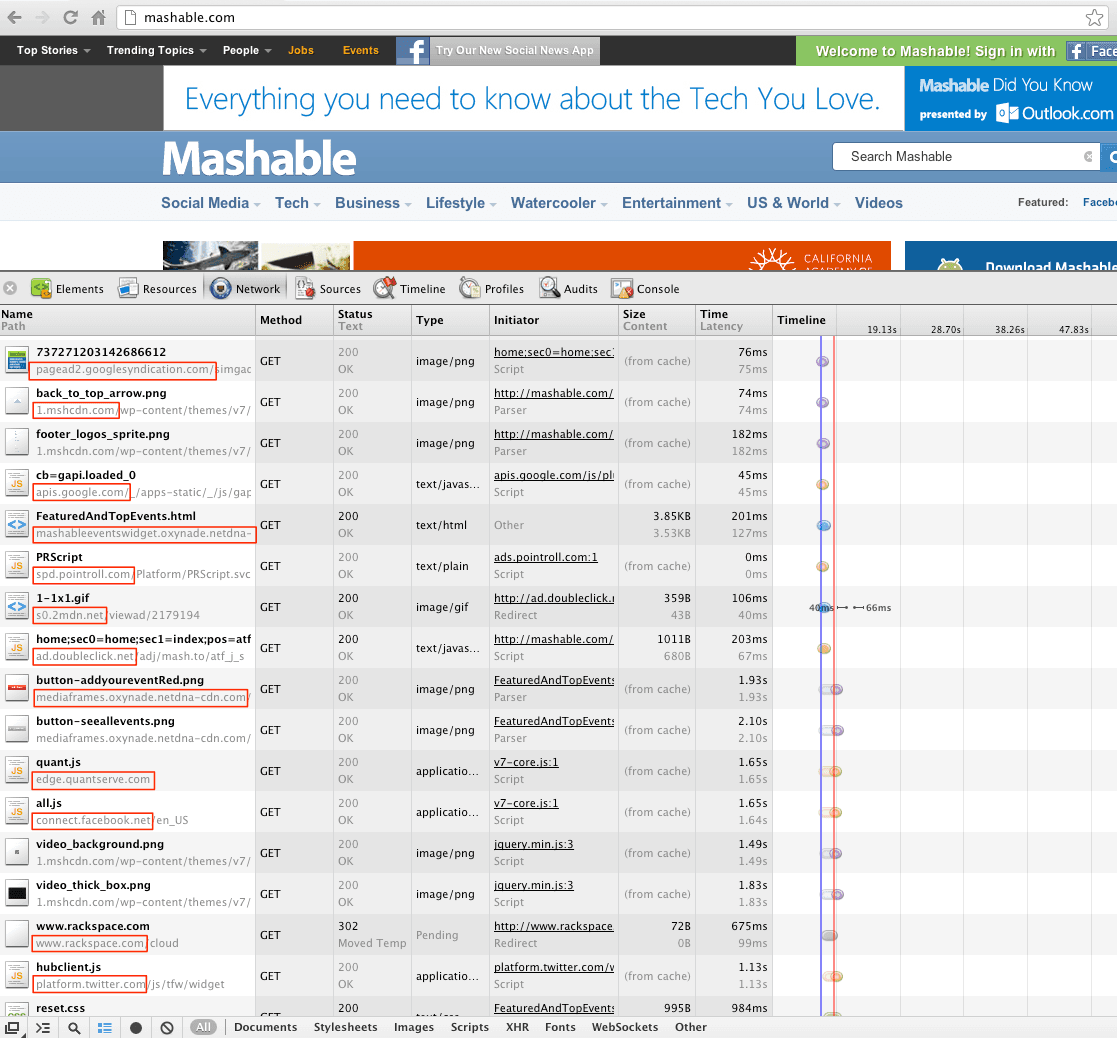
Google Chrome Developer Tools Showing Network Requests to Mashable.com
All of these network requests end up in Forefront TMG's log file, and they also appear when looking at the list of websites in TMG Reporter.
So it is important to remember the sites listed are the sites a user's browser visited, not necessarily the user themselves.
We are actually working towards a solution to this issue in order to make our reports better reflect what a user actually intended to visit. So stay tuned!
More questions?
If you have more questions, don't hesitate to get in touch using your preferred method in our Support Portal (email, chat, phone, public question, carrier pigeon etc).
10 Comments
Archived from our previous comment system.
- anonymous
Sir,
I have a question regarding accesing sites in my college whenever i open sites such as facebook,youtube etc. the following error comes..Error Code: 502 Proxy Error. Forefront TMG denied the specified Uniform Resource Locator (URL). (12202). Is there a way so i can bypass this and access the sites ?- admin
Hi. It looks like Forefront TMG is blocking access to those sites. Are you the System Administrator for your college? If not, I recommend talking to them about enabling access. If you are the administrator of the Forefront TMG server, then take a look at Deb Shinder's article on controlling web access:
http://www.isaserver.org/tu...Good luck!
- Lewis
don't you get a different error message if TMG blocks a site? I found that for that error on ISA server, there's a hotfix available, but it doesn't say that it applies to TMG :(
- Scott Glew
Hey Lewis,
Can you try running a live query in TMG's Logs and Reports view for your IP address, then try and access some of the sites that you get the error message on. What Rule does it say is blocking the traffic? Are you able to add a rule to explicitly allow the sites? Or perhaps a rule to allow the network to external?
Cheers!
Scott
- Bhupesh Bhanot
HiSir , i have one problems. i have gone through so many websites and blog but couldnt findany answer.
i am system administrator of my college. i am running window server 2008 and ftmg 2010 enterprise . everything is fine but i m facing problems with ftmg reports. the reports are generating regularly but no data is comin inside. the reports are blank. for example - top sites , top users , daily traffic its blank no information inside. if u can help me out for this i ll be really thankful to you
..- Scott Glew
Hi,
If the default TMG reports are blank, try the troubleshooting steps in this article: http://technet.microsoft.com/en-us/library/ff849731.aspx
You might also like to check the dashboard and monitoring sections in the Forefront TMG Management Console for any errors, as well as the Windows Event Log.
If problems persist, try our app - Fastvue TMG Reporter :)
- MR.Humam
Hi ...
I install TMG 2010,and the NIS (Network Inspection System) license will expire in a few days,I searched in the Internet for a free license But I did not find any One.
Can u help me to have One ?Thank's :)"
- Scott Glew
Hi, All the information you need for purchasing or evaluating TMG's Web Protection Services can be found here:
http://blogs.technet.com/b/isablog/archive/2010/02/02/forefront-tmg-2010-web-protection-services-licensing.aspxI hope this helps!
- venkatrakesh
I am using SQL Express server based logging for our organisation TMG. The 'client Authenticate' field of web proxy logs contains '0' instead of allowed 'Y' or 'N'.Also 'service' field contains '1'.I have read the documentation but couldnt find why this is happening.I am afraid that there is some issue with the logging of our TMG. Please suggest .
- Khursheed Alam
Hello Sir,
I am the administrator and i have blocked news and social sites in my company for all internet user and give them access through proxy setting. Now i want to open a particular site and i tried to allow access of this website from "URL category override" option, and there i selected news "from filter by" category option. But still they cannot access this site.I don't have more idea about TMG. Will you please help me to give them access for that particular site? I will be grateful to you.