
Reporting on Hostnames with Forefront TMG SecureNAT Clients
Forefront TMG does not log authenticated usernames or site hostnames for SecureNAT Clients. Applying this hotfix solves the hostname issue:
 Etienne Liebetrau
There are a few differences when reporting on clients configured to use Forefront TMG as a Web Proxy Client versus SecureNAT (also known as SecureNET) Clients.
No Authenticated Usernames
One of the key differences is that Forefront TMG does not log user credentials for SecureNAT clients. When defining Internet access rules in Forefront TMG for SecureNAT clients, you can only utilize the “All Users” user object, not the 'All Authenticated Users" object. As SecureNAT clients do not authenticate, all the SecureNAT Internet requests are logged as Anonymous.
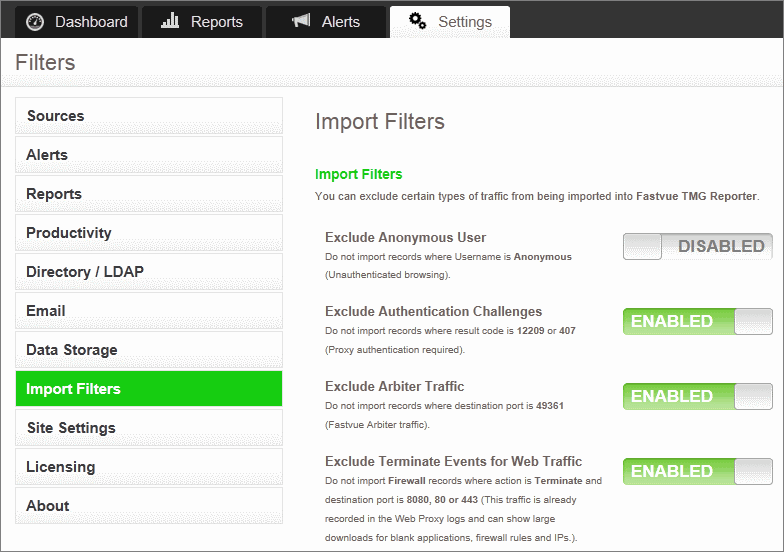
TMG Reporter provides the option to exclude the Anonymous user from being imported (Settings | Import Filters). It is therefore important to understand that doing so will exclude all SecureNAT traffic from your reports.
No Site Hostnames
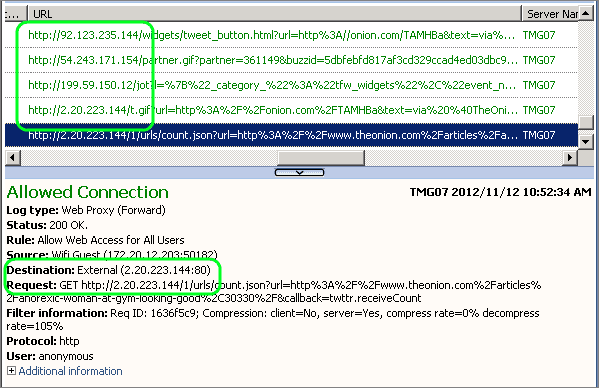
Another difference is that Internet requests are logged with only the destination IP address in the URL as opposed to hostname. If you look at Forefront TMG's logs and reports view, you will see something similar to this for SecureNAT traffic:
The top sites section in TMG Reporter will therefore only contain IP Addresses and not site names such as 'youtube.com'.
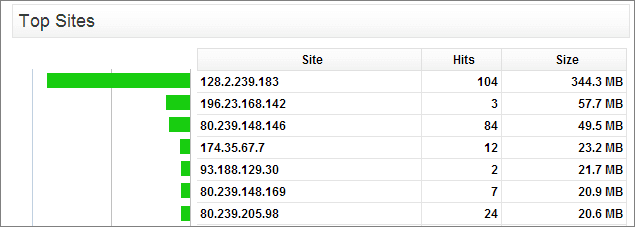
This still gives you a good indication of bandwidth used, but you lose the ability to report on real site names. This becomes even more relevant when you realise that a single IP address can be used for many different purposes. For example, the Akamai content delivery network (CDN) utilized by many popular websites could serve resources for nba.com, jetstar.com and facebook.com all from the same IP.
This limitation is due to Forefront TMG itself not logging the information for SecureNAT clients. Fortunately there is a solution to this!
Logging Hostnames for SecureNAT Clients
Microsoft has published a hotfix that enables the logging of hostnames for SecureNAT clients as it does for Web Proxy clients. The hotfix involves saving the script below as a .vbs file, and running it on your Forefront TMG Server. Your Forefront TMG Server needs to be running SP1 or above.
Applying the Hotfix
Copy the script text below into Notepad and save it as EnableHotfix980723.vbs:
Const SE_VPS_GUID = "{143F5698-103B-12D4-FF34-1F34767DEabc}"Const SE_VPS_NAME = "LogDomainNameForFWC"Const SE_VPS_VALUE = trueSub SetValue()' Create the root object. Dim root ' The FPCLib.FPC root object Set root = CreateObject("FPC.Root")'Declare the other objects that are needed. Dim array ' An FPCArray object Dim VendorSets ' An FPCVendorParametersSets collection Dim VendorSet ' An FPCVendorParametersSet object' Get references to the array object ' and the network rules collection. Set array = root.GetContainingArray Set VendorSets = array.VendorParametersSetsOn Error Resume Next Set VendorSet = VendorSets.Item( SE_VPS_GUID )If Err.Number <> 0 Then Err.Clear' Add the item Set VendorSet = VendorSets.Add( SE_VPS_GUID ) CheckError WScript.Echo "New VendorSet added... " & VendorSet.NameElse WScript.Echo "Existing VendorSet found... value- " & VendorSet.Value(SE_VPS_NAME) End Ifif VendorSet.Value(SE_VPS_NAME) <> SE_VPS_VALUE ThenErr.Clear VendorSet.Value(SE_VPS_NAME) = SE_VPS_VALUEIf Err.Number <> 0 Then CheckError Else VendorSets.Save false, true CheckErrorIf Err.Number = 0 Then WScript.Echo "Done with " & SE_VPS_NAME & ", saved!" End If End If Else WScript.Echo "Done with " & SE_VPS_NAME & ", no change!" End IfEnd SubSub CheckError()If Err.Number <> 0 Then WScript.Echo "An error occurred: 0x" & Hex(Err.Number) & " " & Err.Description Err.Clear End IfEnd SubSetValue
On your Forefront TMG Server, double-click your new 'EnableHotfix980723.vbs' file to run the script.
Verifying the Hotfix
Once the script has run, open Forefront TMG's 'Logs and Reports' view and run a live query. You will see that any new requests will include the host name in the URL field.
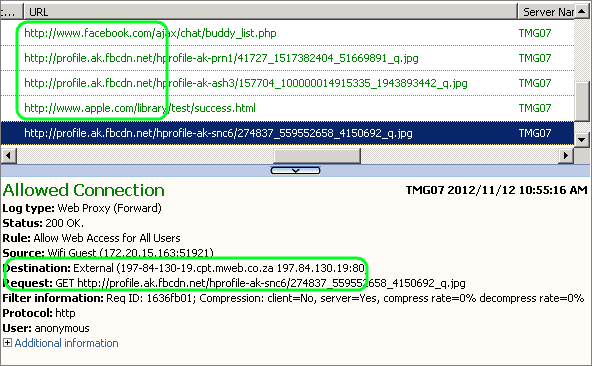
This will also reflect in TMG Reporter's live dashboard. Keep in mind that the Dashboard shows the top sites for the past 12 hours. It may therefore take the 12-hour window to fully clear any 'IP only' records from the dashboard. If you want to start with a fresh dashboard showing only the new site names, just restart the Fastvue TMG Reporter service.
It is important to remember that reports on dates before the script was run will still only show the IP.
Disabling the Hotfix
If you ever need to disable the hotfix and revert back to logging only the IP you can use the following script:
Const SE_VPS_GUID = "{143F5698-103B-12D4-FF34-1F34767DEabc}"Const SE_VPS_NAME = "LogDomainNameForFWC"Const SE_VPS_VALUE = falseSub SetValue() ' Create the root obect. Dim root ' The FPCLib.FPC root object Set root = CreateObject("FPC.Root") 'Declare the other objects needed. Dim array ' An FPCArray object Dim VendorSets ' An FPCVendorParametersSets collection Dim VendorSet ' An FPCVendorParametersSet object ' Get references to the array object ' and the network rules collection. Set array = root.GetContainingArray Set VendorSets = array.VendorParametersSets On Error Resume Next Set VendorSet = VendorSets.Item( SE_VPS_GUID ) If Err.Number <> 0 Then Err.Clear ' Add the item Set VendorSet = VendorSets.Add( SE_VPS_GUID ) CheckError WScript.Echo "New VendorSet added... " & VendorSet.Name Else WScript.Echo "Existing VendorSet found... value- " & VendorSet.Value(SE_VPS_NAME) End If if VendorSet.Value(SE_VPS_NAME) <> SE_VPS_VALUE Then Err.Clear VendorSet.Value(SE_VPS_NAME) = SE_VPS_VALUE If Err.Number <> 0 Then CheckError Else VendorSets.Save false, true CheckError If Err.Number = 0 Then WScript.Echo "Done with " & SE_VPS_NAME & ", saved!" End If End If Else WScript.Echo "Done with " & SE_VPS_NAME & ", no change!" End IfEnd SubSub CheckError() If Err.Number <> 0 Then WScript.Echo "An error occurred: 0x" & Hex(Err.Number) & " " & Err.Description Err.Clear End IfEnd Sub
The Hotfix information from Microsoft can be found at: https://support.microsoft.com/kb/980723
Please note there is a formatting error on the Microsoft page. The script is not split into the two separate ones as it is here. You also need TMG SP1 for the script to work.
If running the scripts is something that makes you uncomfortable, you can also use the LogHostname Plugin from Collective Software. It does exactly the same thing but it comes at a small dollar price. Also note that you may need to change Forefront TMG's logging method to W3C text logs to ensure hostnames make it into the log file when using the LogHostname product. See our support issue: Site names still not showing after setting up loghostname.
Other Resources:
The SecureNAT (SecureNET) Client Guide to the Universe (By Thomas Shinder): https://www.isaserver.org/tutorials/SecureNAT-SecureNET-Client-Guide-Universe.html
Configuring SecureNAT Clients: https://technet.microsoft.com/en-us/library/cc441537.aspx
About SecureNAT Clients: https://technet.microsoft.com/en-us/library/cc995118.aspx
15 Comments
Archived from our previous comment system.
- Uilson Souza
Great Etienne!!! Very good post! I´m learning a lot with your articles! Thank you!
- jet leo
Hi,
I have done above settings and now TMG log show site url. but on my dashboard show IP address even after restart services.
- Scott Glew
Hey Jet,
Sorry to hear that. Assuming you're logging to SQL Express, are you able to query your SQL Express database using something like SQL Management studio to confirm if hostnames are being written to the log or not?
If not, I'd be interested to see if changing your logging to W3C text logs fixes the issue.
Let us know how it goes.
Cheers!
Scott - Scott Glew
Hey Jet,
We finally identified and fixed the issue preventing site domains making it into the reports. We were pulling this information from the DestHost field instead of the URL field. Even with this hot fix the DestHost field only contains IPs.
You can download the latest release at http://fastvue.co/download
Simply run the new installer over the top of your existing installation. The installer will pick up your existing settings, so just click next throughout the wizard without making any changes. Once installed, browse to the site and clear the browser cache by hitting ctrl + F5 (cmd + R on Mac).
Once you're upgraded, the Dashboard will start to rebuild and you should hopefully start seeing site names instead of IPs on the Bandwidth Dashboard. Same for any new reports you run. Old reports will still have IP addresses unfortunately.
Cheers!
Scott
- suhaib Zahid
i am unable to get hostnames. unable to run hostfix file. placed on my desktop.
download http://fastvue.co/download but got the blank report.
please help me in this regard.thank you.
- suhaib Zahid
the errors which i am getting is:
filesystem : could not connect to arbiter on 10.15.5.31: timed out
SQL : could not connect to arbiter on 10.15.5.31: timed out
- Scott Glew
Hi Suhaib,
Make sure you've installed the Arbiter on your TMG Server, and added the access rule in TMG to allow port 49361 TCP outbound, from the Fastvue Server, to Localhost, for all users.
We have a KB article here that should help you troubleshoot the Arbiter connection issue:
http://support.fastvue.co/customer/portal/articles/605813Once data is flowing into TMG Reporter, you should be able to generate reports fine.
- suhaib Zahid
hi Scott,
thank you very much.
its very helpful.
still i am unable to get the URL names. Fastvue is still egnerating Destination IPs instead of URLs.please guide me.
- suhaib Zahid
SCOTT,
i have to take the report of last 7 days and when I am generating the report, i am getting IP's instead of URL's.
- suhaib Zahid
SCOTT,
i have to take the report of last 7 days and when I am generating the report, i am getting IP's instead of URL's.
please guide me if possible.
- Etienne Liebetrau
Hi Suhaib
You should be able to check the TMG to see if it is logging the host names now. Check the Verifying the hotfix section in the article.
If you still are not seeing hostnames then I would suggest going for the plugin from collective to do this
http://www.collectivesoftwa...
Once the host names are being logged and you can verify this it will be available in reporter. Please note that any logs that were captured before this is resolved will still only show the IP.
There is no way to "go back into the old logs and resolve the names"
Regards
Etienne
- suhaib Zahid
Hi Etienne,
thank you for your reply.
i ve downloaded the plugin from collective and when i run the installer, prompt appeared that "I could not find any TMG component in this machine".
please guide me.
Regards,
Suhaib
- Scott Glew
Hey Suhaib,
What build of TMG Reporter are you using? Can I get you to try our latest release available at http://fastvue.co/tmgreporter/downloadbeta. Simply run the new installer over the top of your existing installation. The installer will pick up your existing settings, so just click next throughout the wizard without making any changes. Once installed, browse to the site and clear the browser cache by hitting ctrl + F5 (cmd + R on Mac).
Also make sure you've applied the hotfix to TMG mentioned in this article.
Cheers!
Scott- suhaib Zahid
Hi Scott,
Thank you for your reply.
I am using TMGReporter 2.1 but found no luck.
I have applied the Hotfix but still getting IP's instead of URL.
please guide me further.
Regards,
Suhaib- Scott Glew